

01
Connect Your GS1 Prefix
Enter your GS1 Company Prefix. The app detects your region and shows how many GTINs you have left in it.

Reduce manual work. Save time. Prevent errors. Your products appear in Verified by GS1 shortly after.
Works with your GS1 organization
 GS1 US
GS1 Germany
GS1 Sweden
GS1 Netherlands
GS1 Brazil
GS1 US
GS1 Germany
GS1 Sweden
GS1 Netherlands
GS1 Brazil
List everywhere with numbers you own.


Meets Shopify’s Built for Shopify quality standard.
Why Merchants Switch
Spreadsheets, GS1 portals, manual data entry. It costs you hours, and it costs you listings. Do all of it inside Shopify instead.
The Old Way
With GS1 Assistant
Capabilities
Assign, check, and export. All inside Shopify, all from the number block you already own.

See every product’s barcode status at a glance: Assigned/Unassigned, Valid/Invalid, and Duplicates. Find problems before marketplaces do.

Assign GTINs to your entire catalogue in batches. Connect Shopify Flow to auto-assign when new products are created (Automation plan).
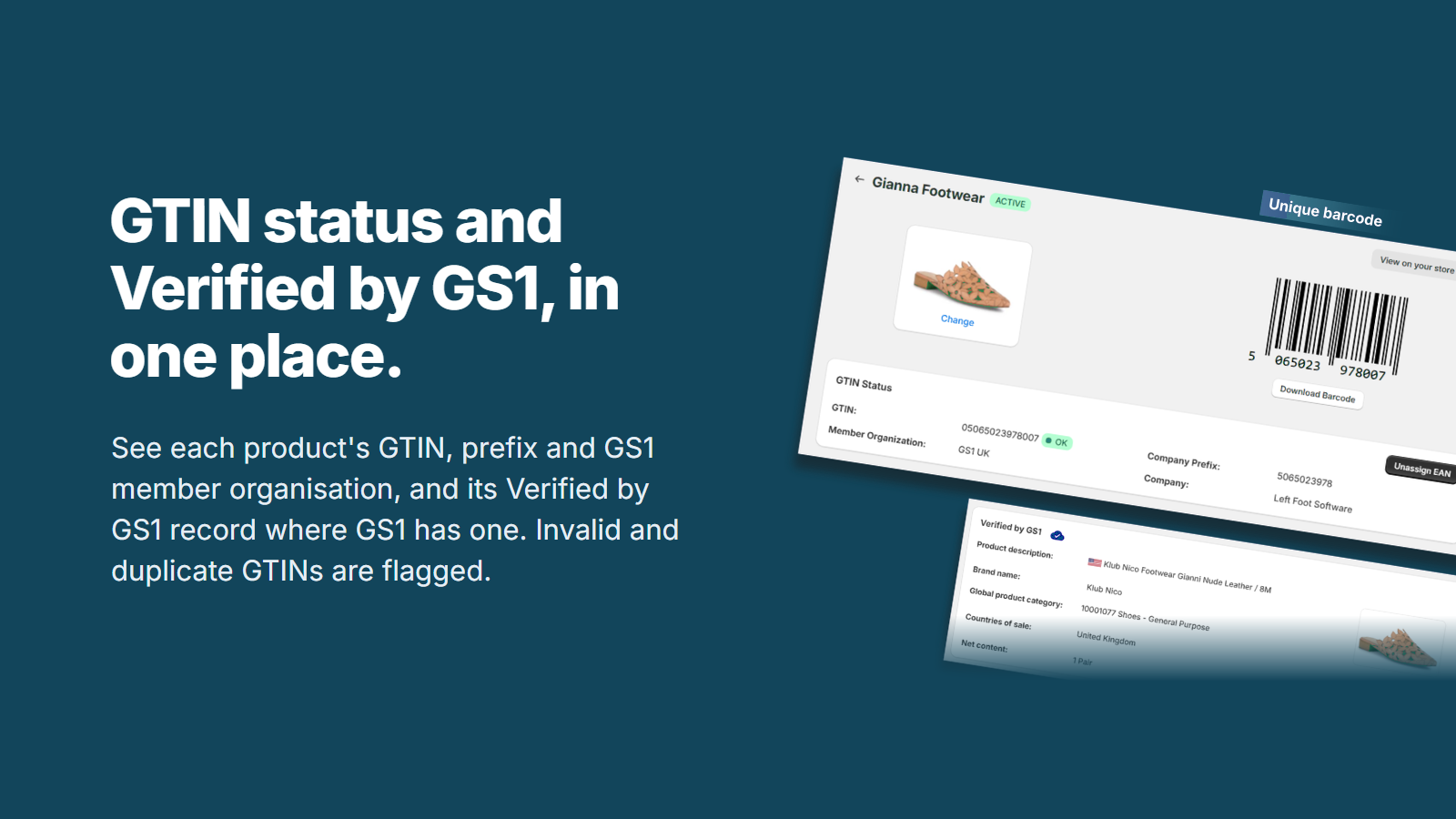
See each product’s GTIN status next to its barcode, and its Verified by GS1 record where GS1 has one. Invalid and duplicate GTINs are flagged, so you can fix them before you list on Amazon or Walmart.

Download a ready-to-upload file in your GS1 organization’s import format.

Catch duplicate GTINs, invalid check digits, and barcodes that don’t belong to you, before they cause rejections.

Direct API connection with GS1 Germany, Sweden, Netherlands and Brazil, where your products are synchronized automatically. Everywhere else, download a file in your GS1 organization’s import format.
Get Started
Easy to use, even if you’re new to GS1. If you have a GS1 Company Prefix, you’re ready. If you don’t, our GS1 Company Prefix setup guide for Shopify covers getting one. To put those barcodes on physical labels, Label Wizard designs and prints barcode labels for your Shopify products, and our guide to printing GS1 barcode labels shows the two apps together.

Enter your GS1 Company Prefix. The app detects your region and shows how many GTINs you have left in it.

One product or your whole catalogue. The app takes the next available codes from your prefix, without duplicates.
List on Amazon, Google Shopping, Walmart, eBay, Etsy or wholesale with GTINs licensed to your business.
Social Proof
Rated 5.0/5 on the Shopify App Store across 10+ reviews.
★★★★★
“We run a Shopify store with more than 20,000 SKUs and manage our own GS1 Norway company prefix. Before GS1 Assistant, our workflow relied on manual Excel spreadsheets, GS1 imports, and countless hours of administrative work.”
★★★★★
“The best thing available for GS1 code management. We have no prior knowledge and the app makes it extremely easy to navigate the complex world of EANs, GTINs etc. Support is also 5 stars.”
★★★★★
“An incredibly helpful and time-saving tool! It takes the guesswork out of product identification and helps ensure everything is formatted and validated correctly.”
★★★★★
“GS1 Assistant has made managing UPC codes effortless. Assigning GTINs is simple, and products appear in Verified by GS1 shortly after.”
★★★★★
“I needed urgently to create GTIN codes for our older stock (600 SKUs). This app saved me 2 days of work!”
★★★★★
“A must-have for any Shopify store managing UPC, EAN, or GTIN barcodes. Accurate assignments without duplicates. Great sync with my GS1 prefix.”
Product Demo
A walkthrough of assigning and verifying barcodes inside Shopify, start to finish.
Free to install. Usage charges apply. Plans differ by the size of GS1 company prefix they support.
Essential
$0 /mo
Plus usage charges
Supports prefixes up to 100 GTINs
| Monthly usage total | Cost |
|---|---|
| First | Free |
| 2–10 | $4.99 |
| 11+ | $9.99 |
Your monthly usage total determines the cost for all usage.
Growth
$4.99 /mo
Plus usage charges
Supports prefixes up to 1,000 GTINs
| Monthly usage tier | Cost per unit |
|---|---|
| First | Free |
| 2–10 | $1 each |
| 11–100 | $0.50 each |
| 101–1,000 | $0.05 each |
| 1,001+ | $0.01 each |
Each tier’s cost per unit only applies to usage within that tier.
Automation
$29.99 /mo $299.99 /yr
or $299.99/yr (save 17%) or $29.99/mo billed monthly
Supports all GS1 company prefixes
All charges are billed in USD through Shopify. Monthly plans renew every 30 days, and the Automation plan can also be billed once a year. Cancel any time from your Shopify admin.
Support
Yes. GS1 Assistant uses your GS1 Company Prefix to assign valid barcodes. The app doesn’t sell or generate its own codes. If you don’t have a prefix yet, purchase one from your local GS1 member organization. US merchants can also purchase directly through the app.
If rejections are caused by invalid or missing GTINs, yes. GS1 Assistant assigns codes from the GS1 Company Prefix you already own and checks them against GS1’s database. Amazon and Walmart go further and verify identifiers against GS1’s data, which is where a resold number gets caught.
They’re the same numbering system at different lengths. UPC is 12-digit (North America). EAN is 13-digit (Europe and global). GTIN is the umbrella term. GS1 Assistant handles all of them. Not sure whether you need a UPC or just a SKU? Read SKU vs UPC vs GTIN on Shopify.
Yes. GS1 Assistant has direct API integration with GS1 Germany, Sweden, Netherlands and Brazil, so products in those countries are synchronized automatically and appear in Verified by GS1 shortly after. Every other region is supported through your GS1 organization’s import format: download a ready-to-upload file.
GTINs that GS1 Assistant has already assigned stay in your Shopify barcode fields. Uninstalling the app does not remove or change your product data.
Yes. GS1 Assistant scans your existing barcodes and shows the validity status of each one. You can bulk-unassign the invalid ones and assign GTINs from the prefix you already own, formatted correctly, with valid check digits and without duplicates.
Yes. Reseller barcodes are not registered to your company. Amazon and Walmart verify identifiers against GS1's data, and a mismatch gets the listing rejected. GS1 Assistant only assigns codes from your own GS1 Company Prefix, so they are verified by GS1, not just generated.
GS1 Assistant supports catalogues of 20,000+ variants, and the Automation plan supports all GS1 company prefixes. One merchant assigned GTINs to 600 SKUs and saved two days of manual work.
GS1 Assistant is available in English, German, Italian, Dutch and Portuguese (Brazil).
GS1 Assistant is free to install, and usage charges apply. Essential is $0 a month plus usage charges and supports prefixes up to 100 GTINs. Growth is $4.99 a month plus usage charges and supports prefixes up to 1,000 GTINs. Automation is $29.99 a month, or $299.99 a year, and supports all GS1 company prefixes. All charges are billed in USD through Shopify, and you can cancel any time from your Shopify admin.
GS1 Assistant accesses your products and collections. It reads your existing barcodes and writes assigned GTINs into your Shopify barcode fields. It does not need access to orders or customer data.
Every invalid GTIN is a rejected listing waiting to happen. GS1 Assistant catches them before the marketplaces do.
Questions? Fast, responsive support, usually from the developer himself.
Free to install · Built for Shopify certified · Cancel anytime