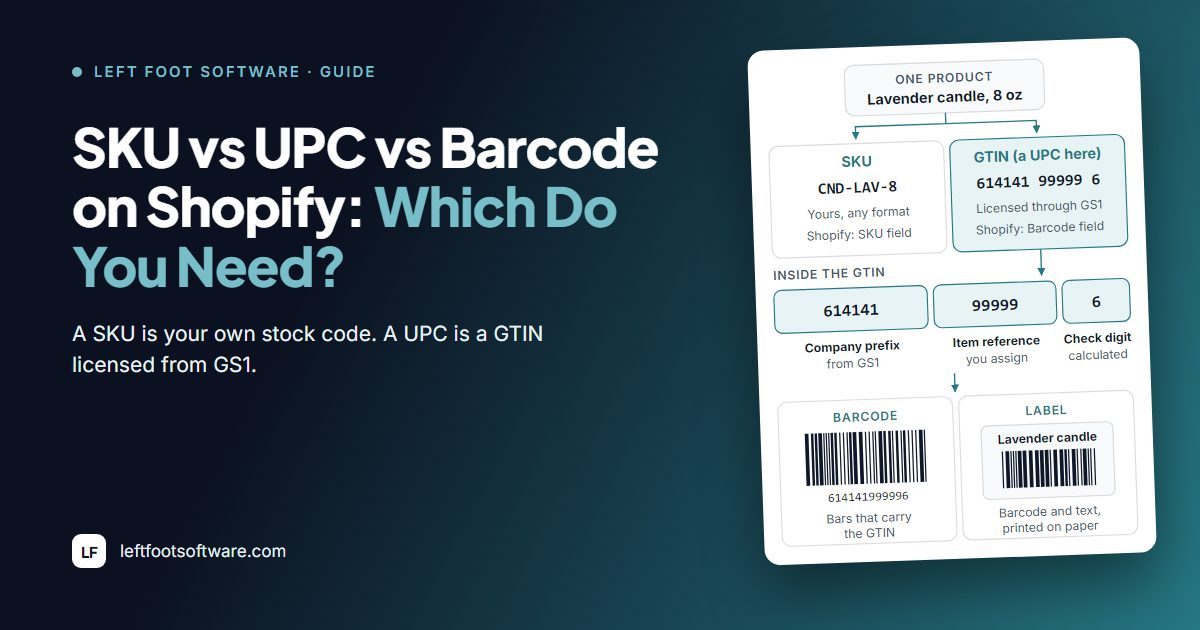
You can run your Shopify store on SKUs alone. But Amazon checks for a GTIN, retail and wholesale buyers may ask for one, and if you make your own products, GS1 has to license that GTIN to your brand.
Is this guide for you? It's for you if someone told you "you need a UPC" and you want to know whether that's true for your products. Quick note: we build GS1 Assistant and Label Wizard, so of course we have opinions. Where it matters, we've linked the source so you can check us.
SKU vs UPC vs EAN vs GTIN vs Barcode: The Five Terms Side by Side
A SKU is yours, a GTIN is your product's global number, UPC and EAN are the two common kinds of GTIN, and a barcode is the printed bars that carry one of them.
Sound familiar? Your supplier says GTIN, Amazon says UPC, and your label printer says barcode. Here's what each word actually means, and where you put it in Shopify:
| Term | What it is | Who creates it | Where it goes in Shopify |
|---|---|---|---|
| SKU | Your own code for a product or variant | You | The SKU field |
| GTIN | The global number for a product | The brand owner, through GS1 | The Barcode field, type GTIN |
| UPC | A 12-digit GTIN, printed as a UPC-A barcode, used mostly in North America | The brand owner, through GS1 | The Barcode field, type UPC |
| EAN | A 13-digit GTIN, printed as an EAN-13 barcode, used mostly outside North America | The brand owner, through GS1 | The Barcode field, type EAN |
| Barcode | The printed bars a scanner reads | Whoever prints the label | Printed from the Barcode field |
Many products have both: your SKU in Shopify's SKU field and the GTIN in its Barcode field.
You can make your SKU anything you like, such as CND-LAV-8 for an 8 oz lavender candle. The Barcode field is different.
You can give it a type, such as GTIN, UPC, EAN, ISBN or ASIN, and then the value has to fit that standard. Leave it on the default type, Custom, and it takes any value up to 255 characters.
Difference Between a SKU and a UPC
| SKU | UPC | |
|---|---|---|
| Who makes it | You | The brand owner, licensed from GS1 |
| Format | Any format you choose | 12 digits, ending in a check digit |
| Same in every store that sells it? | No | Yes |
| What it costs | Nothing | A GS1 licence: single GTINs or a company prefix |
| Where it goes in Shopify | The SKU field | The Barcode field |
| You need it for | Tracking your own stock | Channels and buyers that ask for a GTIN |
GS1 US sums it up in one line: "Two retailers can sell the same item with the same UPC codes, but they will both use their own SKU number."
And the barcode isn't the number, either.
In GS1 US's words, "there are data carriers and the data itself": the bars are the carrier, and the GTIN is the data they carry. That's why you hear "UPC" when people mean the 12-digit number. GS1 US notes that "the term barcode or UPC is sometimes used in place of GTIN-12."
What's Inside a UPC Code
Look closely at any UPC and you'll find three parts. GS1 US's guide uses the example 614141 99999 6:
- Your GS1 company prefix (614141): the first 6 to 10 digits, assigned to your company by GS1.
- An item reference (99999): the next 1 to 5 digits, which you assign to each product and each variation.
- A check digit (6): the last digit, calculated from all the others. GS1 US says it "helps to confirm the integrity of your barcode number."
Do You Need a UPC? Start with Who Made the Product
You need your own UPC only if your business makes the product or sells it under your own brand. If another company made it, use the barcode it already has.
Quick test: who made the thing you're selling?
- Another company made it. You resell its brand, or you dropship it. Its barcode is usually already on the packaging or with the brand, so use that number. You don't need GS1, and you don't need a GTIN app.
- You made it, or it sells under your brand only. Then GS1 has to license your GTIN to your business, as a single GTIN or from your own company prefix.
Your company prefix is what proves those numbers are yours. GS1 US says a company prefix "provides proof that your company, and only your company, is authorized to use your particular prefix and all identification numbers created with it."
You'll need one number for each variant, too. GS1 US says "a new GTIN should be assigned for each product and variation of the product such as size, color, style, or package count." So if you sell a candle in three scents and two sizes, you need 6 GTINs.
Do You Need a GTIN for Shopify, Amazon or Google Shopping?
You don't need a GTIN everywhere. It depends on where you sell:
| Where you sell | What you need |
|---|---|
| Your Shopify store only | SKU onlyA SKU. Shopify calls SKUs "an optional code", and a barcode is optional too |
| Your own shop counter or stockroom | SKU + any barcodeA SKU, plus any barcode your scanner reads, such as an internal Code 128 |
| Google Shopping | GTIN if it has oneA GTIN if your product has one. Google says a store-brand product "generally won't have a GTIN", so you send the brand and MPN instead |
| Amazon | GTIN licensed to the brandA GTIN licensed to the brand: yours, if you make the product. GS1 US says Amazon offers exemptions for a few, very specific product categories |
| Retail chains and wholesale buyers | Ask the buyerDepends on the buyer. Check each buyer's supplier requirements |
Selling on Amazon? Expect a check.
GS1 US quotes Amazon's seller rules: "We verify the authenticity of product UPCs by checking the GS1 database. UPCs that do not match the information provided by GS1 will be considered invalid."
Selling online only? GS1 US's short answer is "maybe": "More and more online companies are requiring GTINs and U.P.C.s for unique product identification." If Google won't approve your products, our guide to GTIN errors in Google Merchant Center walks you through the fixes.
What Shopify Does, and Doesn't Do, with SKUs and Barcodes
Every variant you add gets a SKU field and a Barcode field.
Since September 2026 you can store more than one barcode: "You can add up to 20 barcodes to a product or a variant." Your sales channels still use the first one. Shopify's changelog says "Channels continue to read the first barcode provided."
When you give a barcode a type, Shopify checks its shape: the value "needs to match that standard's length limit and allowed characters." Shopify's changelog puts it this way: "a mistyped digit gets caught as you enter it." Shopify's help page describes no check of who owns the number.
The catch? Shopify doesn't hand out GTINs.
Its help centre tells you: "If you don't have a GTIN for a product, then you can request it from the manufacturer. Learn how to get a GTIN for a product that you manufacture at the GS1 standards website."
Shopify's Free Barcode Tools Make Codes, Not GTINs
Shopify's free Retail Barcode Labels app creates barcodes for your variants. Its help page tells you this about those codes:
- "The Retail Barcode Labels app only generates Code-128 barcodes."
- It uses "the last 8 digits of the variant ID", so, although rare, "two products can sometimes receive the same barcode".
- They "are not suitable for Google Shopping because they can be shared across multiple stores".
- If you create new barcodes for products that already have ones you typed in, the app "overwrites the existing barcodes with new barcodes based on variant IDs."
Merchants notice the duplicates:
"The barcodes generated from this app use the last 8 numbers from the variant URL in Shopify so occasionally it creates duplicates."
A merchant in the US reviewing Shopify's Retail Barcode Labels app, November 2025
Shopify's free online barcode generator also makes Code 128 barcodes: you "enter a number and then generate a barcode in the format of Code 128." You get a Code 128 picture of whatever number you typed. The tool doesn't give you a GTIN.
Here's where it gets confusing: Shopify's own pages disagree about where you should buy barcodes.
Its help centre says "you need to purchase unique barcodes from GS1." The barcode generator page calls GS1 US "the official provider of UPC codes", then tells you that you can buy UPCs from resellers "to save yourself the hassle and cost of paying for and joining the GS1 US." We side with the help centre and GS1 US.
So Shopify stores your barcodes and can print internal ones, but it doesn't assign GTINs. If you make your own products, GS1 Assistant assigns GTINs from your own GS1 company prefix, the next free numbers with no duplicates, and writes each one to Shopify's barcode field.
Already have GTINs on your variants? Label Wizard prints them as EAN-13 or UPC barcodes, and it doesn't change the barcodes in your products.
Moving off the free app? Our guide to Retail Barcode Labels alternatives covers it.
Ways to Get Barcodes onto Your Shopify Products
You have more options than you might think. Here's how they compare:
| Option | Where the number comes from | Is it a GTIN licensed to your brand? | Best for |
|---|---|---|---|
| Type it into Shopify's Barcode field | Your GS1 licence, or the product's maker | Yes, ifit came from your GS1 licence | A few products |
| Ask the product's maker | The brand that made it | Maker'sIt's the maker's GTIN | Resellers and dropshippers |
| Retail Barcode Labels (Shopify, free) | The last 8 digits of the variant ID | NoCode-128 only, and Shopify says not suitable for Google Shopping | Scanning in your own shop |
| Shopify's free barcode generator | Any number you type | Only ifyou type one you license. It draws a Code 128 image and doesn't supply a GTIN | One-off internal codes |
| Barcode generator apps | A number the app makes up | NoGoogle says not to make up a GTIN | Internal codes |
| Apps that resell UPCs | A reseller's stock of numbers | Not usuallyGS1 US warns resold numbers may belong to another company | Not something we'd use for Amazon |
| GS1 Assistant | Your own GS1 company prefix | YesIt assigns numbers you already license | Brands that make their own products |
How to Assign GTINs from Your GS1 Company Prefix in Shopify
If you make your own products, you can get GTINs onto Shopify in four steps:
- License your numbers from GS1. GS1 US offers two routes: single GTINs "with no annual renewal fees", or a company prefix with an initial fee and an annual renewal fee for a larger range. In the US, you can also license a GS1 US prefix from inside GS1 Assistant. Our GS1 company prefix guide shows you how to get one.
- Give each variant its own GTIN. You can type each number into Shopify's Barcode field by hand. Or you can let GS1 Assistant assign GTINs from your own GS1 company prefix, one per variant, singly or in bulk, and write each one to Shopify's barcode field. If your prefix is a UPC prefix, the app asks you to add a leading 0. See how to bulk-assign GTINs to variants.
- Check for gaps and duplicates before you list. GS1 Assistant flags missing, invalid and duplicate GTINs across your products.
- Send your product details to GS1. GS1 Assistant downloads a product file in the import format of the GS1 organisations it supports, including GS1 US and GS1 UK. For some GS1 organisations with an API, including GS1 Germany, Netherlands, Sweden and Brazil, Auto Sync sends your product data for you. GS1 US isn't one of them.
- License numbers from GS1Single GTINs, or a company prefix for a larger range.
- Give each variant a GTINGS1 Assistant assigns them from your prefix and writes each one to Shopify’s Barcode field.
- Check gaps and duplicatesGS1 Assistant flags missing, invalid and duplicate GTINs.
- Send product details to GS1A product file to import, or Auto Sync where your GS1 organisation has an API.


On the Automation plan, GS1 Assistant can also give each new product a GTIN automatically through Shopify Flow. That's Auto Assign, a separate feature from Auto Sync.
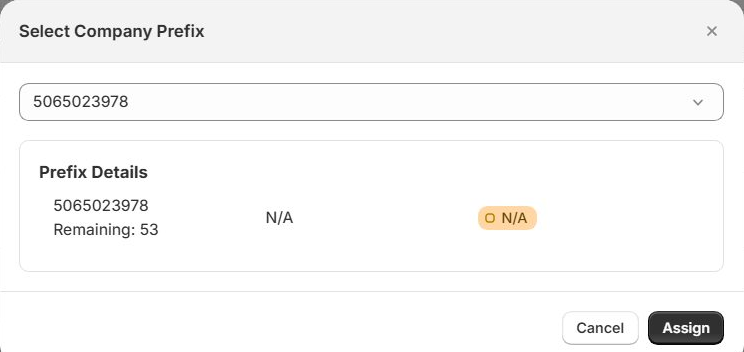
To be clear about what you're getting: GS1 Assistant doesn't give you numbers. You need your own GS1 prefix or GTINs first. It also doesn't check your product data for you: it puts the numbers you own onto the variants you choose.

“I needed urgently to create GTIN code to our older stock (600 SKU), which would else be a nightmare, since GS1 has changed its layout of the bulk upload files. This App saved me 2 days of work! So I do recommend it”
Assign your own GTINs from your GS1 company prefix. If you make your own products, GS1 Assistant puts one GTIN on each Shopify variant and flags duplicates before you list. Free to install. Usage charges apply.
How to Print GS1 Barcodes on Labels for Your Shopify Products
Retail Barcode Labels only generates Code-128 barcodes. If you want the GTIN in your barcode field printed as an EAN-13 or UPC barcode, use Label Wizard. It prints the number your product already has and never makes one up, so your label matches what's in Shopify.
We tried it in our test store. GS1 Assistant assigned 5065023978007 to a Gianna Footwear variant, and Label Wizard put that same number on the label design.
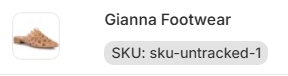
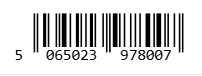
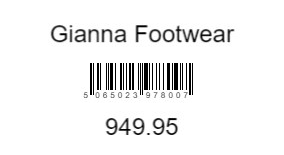
You can print on 400+ label stock templates from Avery, Online Labels and Uline, or on a sheet you set up yourself. Each variant gets its own label with its own barcode, in EAN-13, UPC, GTIN-14, GS1-128 or Code 128.
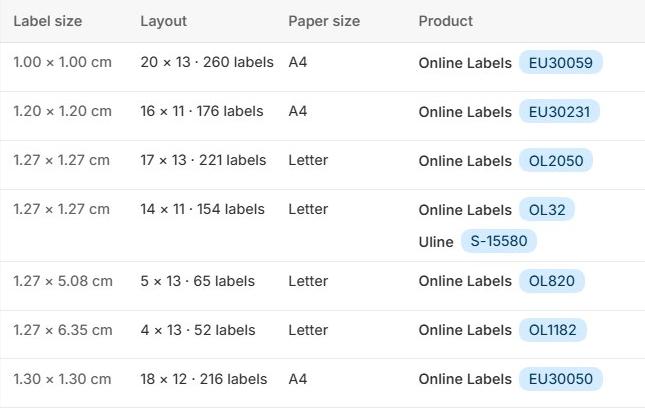
Our guide to printing GS1 barcode labels in Shopify walks you through it, and our barcode label app comparison covers your other options.

“Great app for designing and printing product labels! I can customise labels with product names, barcodes, SKUs, compare-at prices, and metafields.
The variety of label sizes, shapes, and ready-made templates is really useful. It saves a lot of time when managing labels for multiple products.
Highly recommended!”
Three Mistakes That Can Get Your Barcodes Rejected
Want to avoid the "rejected" email? Skip these three.
1. Buying Cheap Resold UPCs
GS1 US warns that "GTINs sourced from unauthorized third parties may already be associated with another company or product, leading to acceptance and data quality issues." And on GS1 US's list of the usual reasons Amazon rejects a UPC: "The GTIN is not licensed to the brand owner".
"Amazon would not accept these barcodes."
A merchant in the US reviewing an app that sells UPC barcodes, November 2023
2. Putting Your SKU in the GTIN Field
Keep your SKU in the SKU field. Google Merchant Center's help tells you to leave the GTIN blank rather than "include incorrect identifiers (for example, internal SKUs or other values specific to your store)."
3. Sending a Made-Up Number to Google Merchant Center
A number a barcode app makes up isn't a GTIN, even if it's 12 or 13 digits long. Google says: "When in doubt don't provide a GTIN (for example, don't guess or make up a value)." Shopify also says its own Retail Barcode Labels codes "are not suitable for Google Shopping", because other stores can share them.
"All bar codes they generate start with 0, google doesn't accept these bar codes, which means all your products will be flagged"
A merchant in the US reviewing a barcode label app, April 2023
The app's developer replied that "Google normally expects GTIN barcodes, which you can buy from GS1."
Selling your own branded product with no GTIN? Google says "you don't need to submit one" and asks you for the brand and MPN instead. Its identifier_exists attribute is for products with no identifiers at all, like custom or handmade goods, and only "if you're certain that your product doesn't have any assigned unique product identifiers."
Frequently Asked Questions
Does Shopify make barcodes for you?
Yes, but not GTINs. Retail Barcode Labels and Shopify's free barcode generator both make Code-128 barcodes. Shopify says the Retail Barcode Labels codes "are not suitable for Google Shopping".
Is a UPC the same as a SKU?
No. GS1 US explains: "A UPC code is accepted globally for that product, while a SKU number is internal and created by a specific brand or retailer."
What's the difference between a SKU and a barcode?
A SKU is the code you make up to track your own stock. A barcode is the printed bars a scanner reads. The bars can carry your SKU, as an internal Code 128 barcode does, or a GTIN such as a UPC, which is the number Amazon and Google look for.
Is a SKU the same as a GTIN or EAN?
No. You create a SKU yourself, in any format, and each store that sells a product can use its own. A GTIN, which covers UPCs (12 digits) and EANs (13 digits), is licensed to the brand owner through GS1 and stays the same wherever the product is sold.
Is a GTIN the same as a UPC?
A UPC is one kind of GTIN. GS1 US says a GTIN-12 "is synonymous with UPC". A GTIN can also be 8, 13 or 14 digits long.
Can I use a UPC as my SKU?
You can, but they do different jobs. Your SKU is your own code, while a UPC is the same in every store that sells the product. Shopify gives you a separate field for each.
Can I make up my own UPC?
Not one you should send to Amazon or Google as a GTIN. Google says "don't guess or make up a value", and Amazon, as GS1 US quotes it, checks UPCs against the GS1 database. GS1 licenses a real UPC to the brand owner.
How can I check who owns a UPC?
GS1 runs a public database of company prefixes, the GS1 Company Database (GEPIR). GS1 US says your customers can check a prefix there to see which company it's registered to.
Do I need a UPC to sell on Shopify?
Not for your Shopify store itself. You need one when a channel asks for it: Amazon generally does, and retail buyers may, so check each buyer's supplier requirements. If another company made your product, use its existing barcode.
Can I use my SKU as a barcode?
For your own stockroom, yes. You can print your SKU as a Code 128 barcode for your scanners. Just don't send it to Google or Amazon as a GTIN.
What's the difference between a UPC and an EAN?
Both are GTINs. A UPC carries 12 digits and is mostly used in North America. An EAN carries 13 digits and is "predominately used outside North America," according to GS1 US.
Wondering whether UPCs are going away? See GS1 Sunrise 2027 and 2D barcodes.
Do dropshippers need UPCs?
Usually not their own. If you dropship another brand's product, it already has its maker's barcode, so use the number your supplier gives you.