Is this guide for you? This is for stores that manufacture, formulate, or otherwise own the products they sell, the kind of business a GS1 Company Prefix is designed for. If you resell or dropship other brands' products, you need the barcodes those brands already assigned, because your own prefix on someone else's product creates a brand mismatch. We make GS1 Assistant, the Shopify app used in the setup steps.
What Is a GS1 Company Prefix?
A GS1 Company Prefix is a block of numbers licensed to your business by GS1, the nonprofit standards body behind the barcodes on retail products worldwide. Every GTIN you assign starts with your prefix, which is how a marketplace traces a barcode back to the company that makes the product.
You license a prefix rather than own it, and it stays active while your GS1 membership is renewed.
How It Differs from a GTIN, UPC and EAN
These terms get used loosely, and the mix-up causes setup mistakes:
- GS1 Company Prefix: the number block you are licensed.
- GTIN (Global Trade Item Number): the full barcode number, built from your prefix, a product reference you assign, and a check digit.
- UPC: the 12-digit GTIN, used mainly in North America.
- EAN: the 13-digit GTIN, used mainly everywhere else.
Each product gets one GTIN, so never give the same product both a UPC and an EAN.
How Long Is a GS1 Company Prefix?
A GS1 Company Prefix is between 4 and 12 digits long. The length depends on how many products it has to cover.
A GTIN has a fixed length, so a longer prefix leaves fewer digits for product references. That's why a prefix sized for 10 products is longer than one sized for 100,000.
What the First Digits Tell You (and What They Don't)
The first two or three digits show which national GS1 organisation issued the prefix. They don't show where the product was made. A GTIN starting 436 comes from a prefix issued by GS1 Germany, but the product itself can be made anywhere.
Some common ranges:
| First digits | Issued by |
|---|---|
| 001-019, 030-039, 060-139 | GS1 US |
| 300-379 | GS1 France |
| 400-440 | GS1 Germany |
| 450-459, 490-499 | GS1 Japan |
| 500-509 | GS1 UK |
| 680-681, 690-699 | GS1 China |
| 730-739 | GS1 Sweden |
| 754-755 | GS1 Canada |
| 789-790 | GS1 Brazil |
| 870-879 | GS1 Netherlands |
| 890 | GS1 India |
| 930-939 | GS1 Australia |
That's a selection; GS1 publishes every range on its company prefix page. Numbers starting 020-029, 040-049 or 200-299 are reserved for in-store or internal use, and Google Merchant Center doesn't accept them as GTINs.
Do You Already Have a GS1 Company Prefix?
Some merchants have a prefix and don't know it, because whoever registered it left the company or it was set up years ago alongside a wholesale account. Check these before assuming you need to start over:
Your prefix is printed on the certificate issued at signup. If you can't find it, contact your national GS1 organisation.
The first several digits of a UPC or EAN you've shipped are your prefix. Cross-check it against a GS1 invoice, since a barcode a print shop generated without a real prefix won't hold up.
Search for a GS1 US, GS1 UK, or regional GS1 invoice. Annual renewals slip out of view when the person who set this up has moved on.
If none of that turns anything up, you don't have one yet.
Reading Your Certificate: GS1 Company Prefix vs U.P.C. Company Prefix
GS1 US and GS1 Canada certificates show two numbers: a GS1 Company Prefix and a U.P.C. Company Prefix. They're the same prefix; the GS1 version has a zero added to the front.
Which one you use depends on what you're making. GS1 US says to use the U.P.C. version for 12-digit UPC barcodes, and the GS1 version for its other identifiers. Software that asks for your prefix may want either, so check which one its field names.
Lost the certificate? In your GS1 US account, open Manage Account, then View Licenses & Download Certificates. For other GS1 organisations, ask them directly.
Look Up a GS1 Prefix for Free
GS1's free public lookup is Verified by GS1, which replaced the older GEPIR database; the old GEPIR address now redirects there. It searches by:
- a GTIN, the barcode number on a product
- a GLN (Global Location Number), GS1's number for a company location
- a company name and country
Look up a barcode from your own range to see which company the prefix is licensed to, unless that company has chosen to withhold its name. GS1 US offers the same data as the GS1 Database, with up to 30 free searches a day.
Company Prefix vs. a Single GTIN: Which Do You Need?
GS1 US also sells single GTINs without a full company prefix, at a one-time $30 each with no annual renewal. Each purchase is separate, with no room to assign more from it later.
At GS1 US prices, nine single GTINs ($270) already cost more than a 10-GTIN prefix's first year ($250). The prefix then adds a $50 renewal each year, so for a very small, fixed product line, singles can still come out cheaper over time.
How to Get a GS1 Company Prefix
You license a prefix from your national GS1 organisation, not from Shopify. The fee goes to GS1 and is separate from any Shopify app subscription.
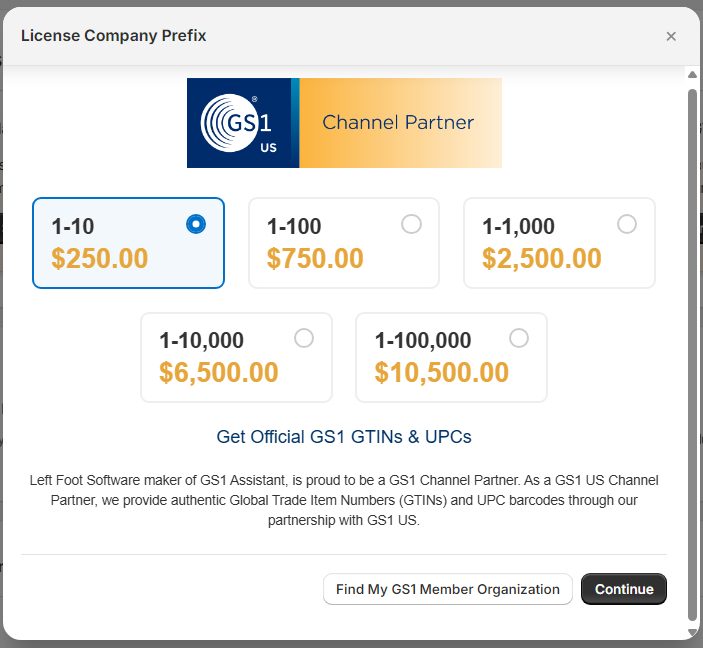
In the US you can also license one through a GS1 US Channel Partner, a company GS1 US authorises to sell its prefixes. Left Foot Software is one, so GS1 Assistant offers GS1 US prefixes in the app.
- Estimate how many products and variants you need to identify. Each size, colour, and bundle needs its own GTIN, so a small product line with several variants adds up faster than it looks.
- License a prefix sized to that number through the GS1 organisation where your business is based. If you sell in the US to one of the few retailers that still require 12-digit UPCs, that prefix needs to come from GS1 US or GS1 Canada.
- Pay the membership fee and receive your certificate with your prefix printed on it.
- Start assigning GTINs from your prefix to your products.
Applying Through GS1 US
GS1 US runs this as a membership, and you size your prefix to your catalogue. Once you're licensed, GS1 US Data Hub (its online tool for creating product records) walks you through assigning your first GTINs.
Applying Through GS1 UK (and Other National GS1 Organisations)
GS1 UK membership works the same way, as an annual membership. Most other countries run an equivalent national GS1 organisation with its own pricing. Search "[your country] GS1" if you're outside the US or UK.
Sizing Your Prefix to Your Catalogue
Size for where your catalogue is headed. A smaller prefix is cheaper, but outgrowing it means licensing a second one.
Expecting new variants, colourways or a second product line within a couple of years? Size for that now.
Membership Cost and Renewal
GS1 US prices a company prefix by how many products it covers, with a separate annual renewal on top of the initial fee. These figures come from the GS1 US store's company prefix page:
| Product capacity | Initial fee | Annual renewal |
|---|---|---|
| Up to 10 | $250 | $50 |
| Up to 100 | $750 | $150 |
| Up to 1,000 | $2,500 | $500 |
| Up to 10,000 | $6,500 | $1,300 |
| Up to 100,000 | $10,500 | $2,100 |
GS1 US payments are non-refundable, so size deliberately rather than defaulting to the cheapest tier. Budget for the renewal as a recurring cost: if it lapses, GS1 marks the licence inactive until you renew.
This is licensing the right to assign GTINs. It doesn't register a specific product with Amazon, Google, or any retailer. Each of those still needs the GTIN entered on its own platform, which is where the Shopify setup comes in.
What Happens When You Run Out of Numbers
Every prefix has a fixed capacity. Once you've used every GTIN in it, GS1 US Data Hub shows the message "You do not have capacity to assign a GTIN to this product".
GS1 US's answer is to license another GS1 Company Prefix, or to buy single GTINs if you only need a few more. Other GS1 organisations handle it their own way, so ask yours.
How to Set Up Your GS1 Company Prefix in Shopify
Shopify has a barcode field on every product and variant, but it doesn't check the format or check digit of what you type in. A number that looks right gets saved, and the problem doesn't surface until a marketplace rejects it.
Several Shopify apps fill that gap; our comparison of Shopify barcode and GTIN apps covers the options. The steps that follow use ours.
-
Add your prefix once, in GS1 Assistant's setup screen.
GS1 Assistant asks for the GS1 Company Prefix: if your certificate shows a U.P.C. Company Prefix, add a 0 to the front.
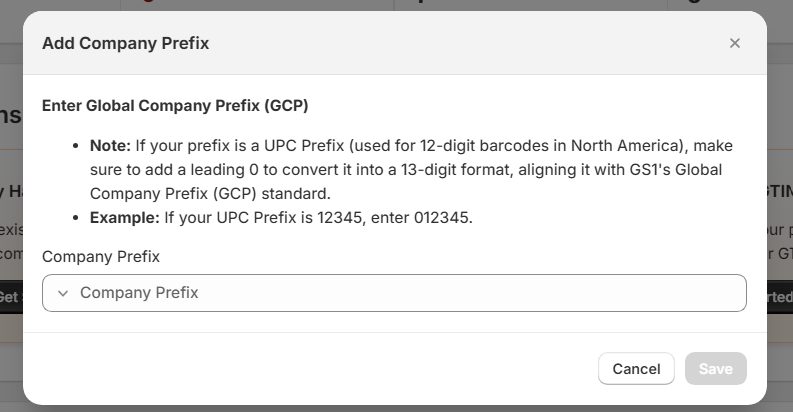
Step 1 · The Add Company Prefix dialog -
Assign your own barcodes to products and variants from that prefix. The dialog shows how many GTINs your prefix has left, and the app checks format and check digit as you go.
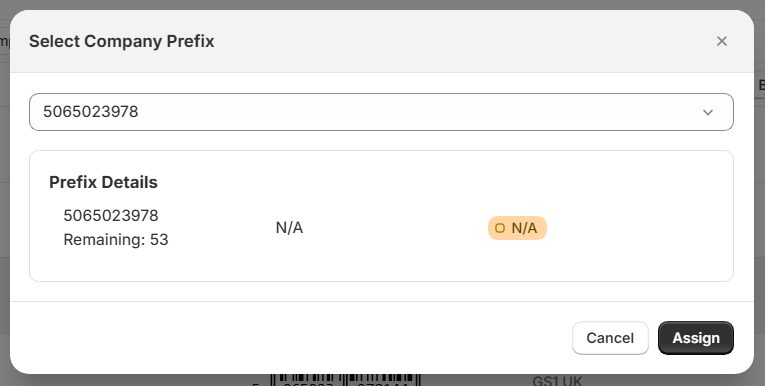
Step 2 · Pick the prefix, then Assign The count is based on the GTINs assigned in your Shopify store, so it may not know about numbers you've used outside Shopify.
-
Run duplicate detection across your catalogue, so no two variants share a GTIN.
Assigning GTINs across many variants at once? Our bulk-assign guide covers the CSV path and the duplicate check.
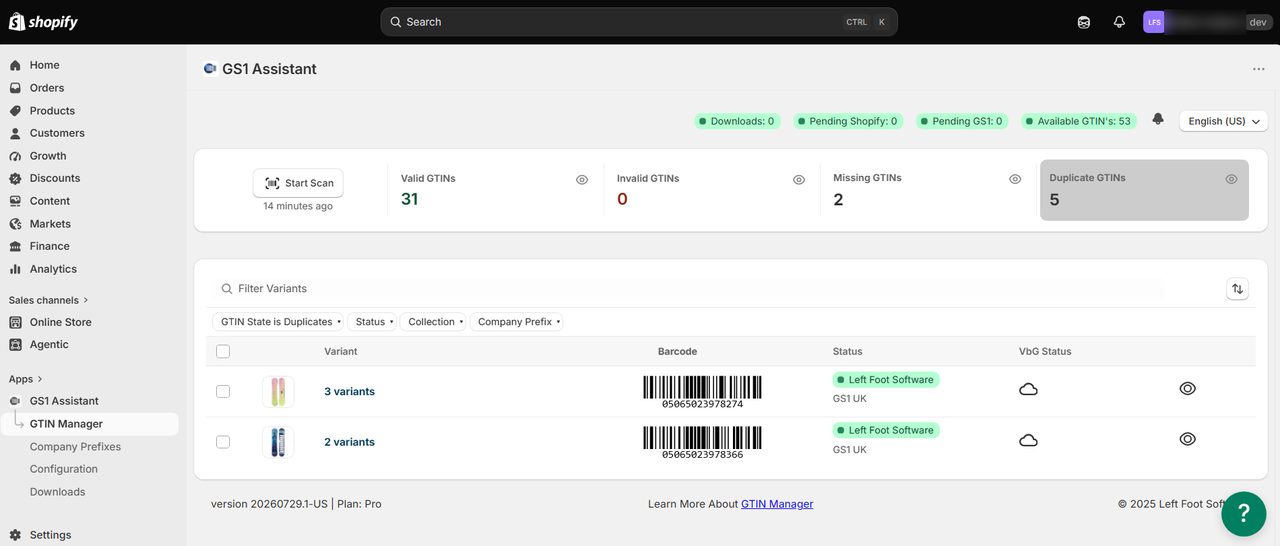
Step 3 · GTIN Manager filtered to duplicates -
Confirm it worked by checking each product's Verified by GS1 status.
GS1 Assistant is free to install; usage charges apply. Plans differ in the prefix sizes they support: the entry plan handles prefixes of up to 100 GTINs. Check the current plans on the listing against your prefix before you connect it.
Have a prefix? Try the setup on your own products
GS1 Assistant covers steps 1 to 3: storing your prefix, assigning GTINs from it, and finding duplicates. The prefix itself still comes from GS1.
Does Your GS1 Organisation Connect Automatically?
Assigning GTINs works the same way whichever GS1 organisation issued your prefix. What differs is how those assignments reach your GS1 account:
- Auto Sync, in some countries. Where your GS1 organisation offers a direct connection (an API) that the app supports, GS1 Assistant sends your assigned products to your GS1 account automatically. That currently includes GS1 Germany, GS1 Sweden, GS1 Netherlands and GS1 Brazil.
- An import file, for many others. For organisations including GS1 US, GS1 UK, GS1 Canada and GS1 France, download an import file from GS1 Assistant in that organisation's format. Then upload it to your GS1 portal, such as Data Hub for GS1 US or My Numberbank for GS1 UK.
Connecting is an optional later step. Auto Sync is also different from Auto Assign, which gives new products a GTIN automatically.
Common Mistakes That Cause Marketplace Rejections Later
These four setup mistakes tend to surface as rejections after a product goes live.
1. Reusing a GTIN Across Variants
Each size, colour, or bundle needs its own GTIN, because a GTIN identifies exactly one product. When two variants share one, the marketplace can't tell them apart.
2. Skipping Duplicate Checks After a Bulk Import
A copy-paste error in a bulk-import spreadsheet can give two products the same GTIN. Nothing flags it until something checks for duplicates.
3. Treating a Resold or Generated Number as Equivalent
A barcode that passes a check-digit test can still belong to another company. A bulk UPC reseller, for example, hands you numbers from someone else's prefix, so GS1's records show the product belonging to a different company. That surfaces only when a marketplace checks, which can be well after the listing went live.
Walmart cross-references GTINs against the GS1 database, and treats an item registered for one brand but set up under a different brand as invalid.
4. Amazon Flags a GTIN Not Licensed to Your Company
GS1 US quotes Amazon Seller Central saying Amazon verifies UPC authenticity against the GS1 database, and that UPCs which don't match the information GS1 provides are treated as invalid. In that case the GTIN traces back to a company other than the one selling the product.
The fix is assigning a GTIN from a prefix your own business licenses, then updating the listing with the corrected number. If Amazon requests proof, provide your GS1 certificate to confirm the brand association.
How to Confirm Your Setup Is Working
Once GTINs are assigned, check Verified by GS1 status rather than assuming the setup is correct. For a GTIN from a correctly licensed prefix, Verified by GS1 shows the licence details, usually with your company name.
Product details appear there only after they reach your GS1 organisation, for example through Auto Sync (GS1 Assistant's automatic connection, available in some countries) or an uploaded import file. For a GTIN from an invalid or unregistered prefix, Verified by GS1 reports that it "could not be assigned to a valid GS1 license".
Checking Verified by GS1 Status
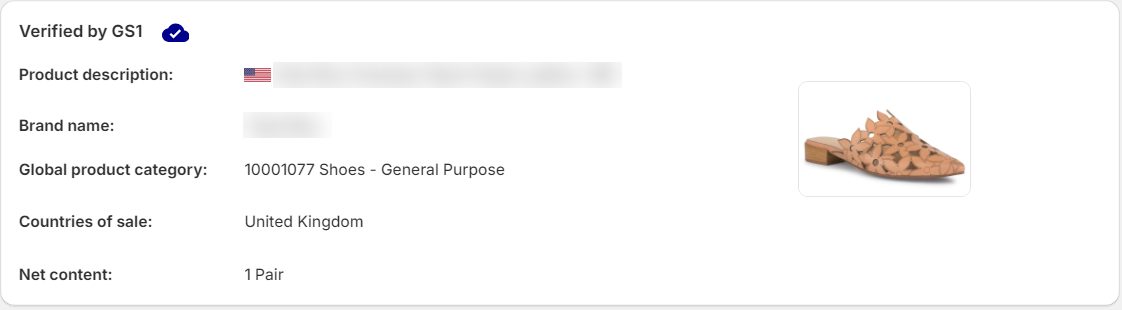
GS1 Assistant surfaces this status per product, which is a faster check than waiting for a marketplace to reject something and working backward from there.
What to Do If a Product Shows as Invalid or Unverified
Match what you see to its likely cause:
- GS1 Assistant marks the barcode "Not GTIN". Look for a space or an invisible character in the Barcode field, often left by an earlier CSV import.
- Verified by GS1 shows the licence but no product details. The details haven't reached your GS1 organisation yet, through Auto Sync or an uploaded import file.
- Verified by GS1 can't find a new or renewed prefix. It can take from a few hours to about a week to appear.
Frequently Asked Questions
Do I need a GS1 Company Prefix?
Not to sell in your own storefront; Shopify doesn't require one. It becomes close to unavoidable once you list on Amazon or Walmart Marketplace, since both check GTINs against the GS1 database. For a handful of products, single GTINs from GS1 US can cover it without a full prefix.
Walmart runs a GTIN exemption process for private-label and handmade products, but you request it per brand and product type, and it has to be approved. Google Merchant Center works differently. It doesn't look your barcode up in GS1's records, but it does check:
- that the check digit is correct
- that the GTIN isn't in a restricted or coupon range
- that the GTIN is right for the product, and that its own records tie it to your brand ("GTIN not related to brand")
Our Merchant Center GTIN errors guide covers each message.
Can I use a GS1 prefix from one country in a Shopify store based in another?
Yes. A GS1 Company Prefix is valid worldwide, whichever country's GS1 organisation issued it. You apply through the GS1 organisation where your business is legally based, and the GTINs work on marketplaces worldwide.
Do I need a new prefix for a second product line or brand?
Not necessarily. One prefix can cover multiple product lines if it was sized with enough capacity.
A separate brand under a different legal entity is the more common reason to license a second prefix. If you're unsure which applies, ask your national GS1 organisation.
Does printing the barcode on packaging require anything extra?
No. A valid GTIN prints the same way regardless of where it came from. Getting the number right and getting it onto a physical label are two separate problems; we cover the second one in our guide to Shopify barcode label apps.
Will my barcodes change when shops move to 2D barcodes in 2027?
No. GS1 Sunrise 2027 is a goal for shop tills to read 2D barcodes as well as striped ones, and a 2D barcode carries the same GTIN you assign from your prefix. What GS1 Sunrise 2027 means for your Shopify store covers what changes and what doesn't.
Where to Go From Here
Once your GTINs are assigned, getting them onto a printed label is the next job.
Already have a prefix? Install GS1 Assistant to assign GTINs, catch duplicates and check Verified by GS1 status without spreadsheets.