
Google shows you one message, but four different things cause it. In two of them, the barcode you sent is wrong. In the other two, Google never got a barcode it could use.
A GTIN is the number underneath a barcode. The two words mean the same thing, and only barcode appears from here on.
Which pair you are in decides what you do next, because you can fix only one problem in each pair in the Barcode box in Shopify.
Is this for you? Use it if Merchant Center has disapproved or limited your products in Google Shopping or free listings, and the message mentions a GTIN or a barcode. If you resell other brands' products, your answer is short and it is in the "not related to brand" section: the barcode belongs to the brand you resell, so ask them for it. Most of what follows is for stores that make their own products, or pay someone else to make them. Google's advice says to ask the manufacturer for the barcode, and if you are the manufacturer there is nobody to ask.
Start here: which of the four problems do you have?
Two checks tell you which of the four you have. Both take under a minute, and you need the answers before you change a single barcode.
- In Merchant CenterFind the exact wording of the error
Open Products → Needs attention, then filter by the issue. Write down the wording Google uses and how many products it affects.
- In ShopifyLook at the Barcode box
Open one of those products, scroll to the Inventory section, and check whether the Barcode box is empty or has a number in it.
![The Diagnostics page in Google Merchant Center, with the left navigation showing Overview, Products, Diagnostics and All products. Four coloured tiles read Active items 11,048, Expiring 0, Pending 0 and Disapproved 96. Below them the issue list shows a promotional overlay affecting 80 products, a mismatched price affecting 19, Incorrect value [identifier exists] affecting 6, and Limited performance due to missing value [gtin] affecting 1,693.](/images/blog/gmc-gtin-item-issues.jpg)
Check 1 names your problem. Check 2 tells the two "no number" problems apart, because an empty Barcode box and a filled one fail for completely different reasons.
| Kind | Google's message | What it means | Fix in Barcode box? | Do this first |
|---|---|---|---|---|
| No number | "Missing or incorrect GTIN" | The Barcode box on that variant is empty | Only if you already own barcodes | If you own barcodes, add one to the variant's Barcode box. If you have never owned any, start at Do you need a GTIN? |
| No number | Barcode filled in, Google still says it is missing | Your barcode is in Shopify, but the product is not getting through to Google | No | Check the Google & YouTube channel in your Shopify admin, not the Barcode box |
| Wrong number | "Invalid GTIN in unsupported format" | Wrong number of digits, letters or symbols in the barcode, or a failed check digit | Yes | Correct the digits, then ask Google to review it again |
| Wrong number | "GTIN not related to brand" | Google's records do not link that barcode to the brand name on your listing | No | Reselling: ask the brand for their barcode. Your own brand: use a barcode GS1 licensed to you |
Google is part-way through renaming these, so your message may not match the table's wording word for word. The same problems also appear with the attribute in square brackets:
- "Missing or incorrect GTIN" also appears as "Limited performance due to missing value [gtin]".
- "Invalid GTIN in unsupported format" also appears as "Invalid value [gtin]".
- "GTIN not related to brand" is the same in both.
Match your message to the table by what it describes, not by the exact words. Both namings are live in Google's own help centre today.
How urgent is it?
Not every problem takes your product off Google. Merchant Center uses two words for two very different outcomes, and knowing which you have matters.
Does your message name shipping, images, availability, price or apparel instead of a barcode? Then a barcode fix will not help here, and that is good news: those problems are far more common. DataFeedWatch's 2022 report found shipping and image settings caused 44% of product ad disapprovals. Barcode errors are harder to sort out than they are common.
"Missing or incorrect GTIN": the barcode box is empty
Google's message covers two different situations at once. It says the values you submitted "are either missing or aren't recognized as a valid identifier".
An empty Barcode box is the usual cause, and Shopify tells you exactly where that box is: "Add a barcode (GTIN): In your Shopify admin, go to Products, open the product, and add the barcode in the Inventory section". You set a barcode per variant, so a product in five sizes needs five barcodes.

The SKU field beside it is a different thing: your own stock code, not a GTIN. Our guide to SKU vs UPC vs GTIN on Shopify explains which one goes where.
Shopify's Barcode field uses the Custom type by default, and Custom takes any value up to 255 characters. Since September 2026 you can set a type such as GTIN or UPC, and Shopify then checks the number's length and characters, but not whether the number is really yours. So people fill an empty box with something wrong, and swap a "no number" problem for a "wrong number" one.
Because Shopify doesn't check who owns a number, a second mistake slips through too: the same barcode pasted onto several variants at once during a CSV import. Each copy is a valid number on its own, so nothing looks wrong in Shopify. You only find out when Google disapproves the products.
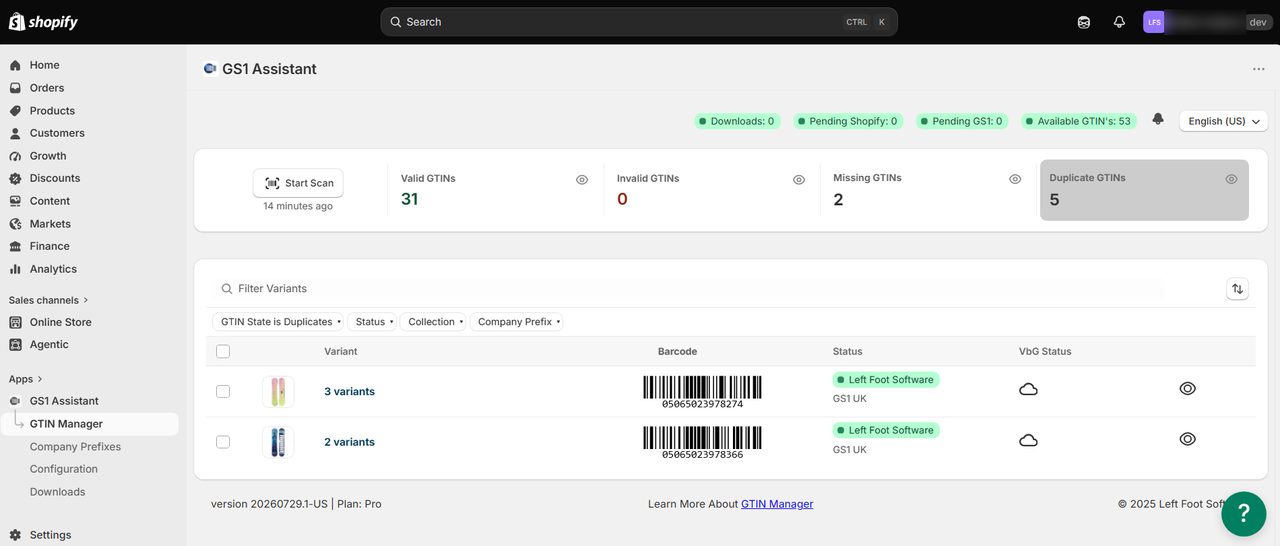
To find a duplicate, you have to compare every variant's barcode against every other one in your catalogue. If you are doing that across a large catalogue, our guide to bulk-assigning GTINs to Shopify variants covers the CSV route.
"Invalid GTIN in unsupported format": wrong digits or a failed check digit
This is a wrong number problem, and the most straightforward of the four to fix. Google names four causes worth knowing:
- Letters or symbols. The barcode contains "characters that aren't numerals".
- The wrong number of digits. "GTINs are 8, 12, 13, or 14 digits".
- A failed check digit. You work out the last digit of a barcode from the digits in front of it. If it does not match, Google rejects the barcode.
- A restricted prefix. The prefix is the first one or two digits. Some are set aside for shop-till and coupon use, and Google will not accept them.
The check digit is the one that catches people out, because a wrong check digit looks exactly like a right one.
Swap two digits round by accident and the barcode still prints, and still scans in your shop, but it fails Google's check. With the default Custom type, Shopify doesn't run that check, so you do not see the mistake until Google disapproves the product.
You can check a barcode yourself before you resubmit it. Two free tools do it without an account:
- Stocksmith's UPC and GTIN calculator checks a complete barcode, including 14-digit GTINs, and tells you whether the last digit is right.
- GS1 US's Check Digit Calculator works the other way round. Type the barcode without its last digit, and it gives you the digit that belongs there. If it does not match yours, the barcode was mistyped.
Give each tool the number it asks for. Some calculators that want the shorter number will take the full barcode and quietly add another digit to it, instead of warning you.
A correct check digit only proves the barcode was not mistyped. It does not tell you who the number belongs to.
You can easily miss restricted prefixes too, because those numbers look ordinary:
- Prefixes 02, 04 and 2 are for shop-till use inside a single store. Google's instruction is direct: "Don't submit a GTIN in the restricted ranges... prefixes: 02, 04, or 2".
- Coupon prefixes get their own error, called "Unsupported GTIN". Google applies it to barcodes that start 981, 982, 983, 984, 99 or 05, because those are "only used for coupons".
A label printer or till system made a barcode starting 02 or 2 for use inside one shop. It was never a real barcode for selling online, so retyping it will not help. You need a different one, and Do you need a GTIN? covers where it comes from.
Correct the number, then ask Google to review it again. Google says a change "may take 24-72 hours to reflect on the 'Needs attention' page". If you want a tool that catches this before Google does, our roundup of Shopify barcode and GTIN apps compares what each one checks.
"GTIN not related to brand": the barcode belongs to another company
This is the other wrong number problem, and the only one of the four you cannot fix by typing a different number. Google's description is specific: "the value you have submitted for the GTIN [gtin] attribute isn't associated with the value you submitted for the [brand] attribute".
Every other problem here is a typing mistake. Here the barcode is a real, valid number. It just belongs to a different company, and nothing you type in the Barcode box changes who a barcode belongs to.
A check-digit tool will not catch this either, because a barcode licensed to another company has a correct check digit too.
Does Google check your barcode against the GS1 database?
GS1 is the organisation that issues barcode numbers worldwide. You probably assume Google looks your barcode up in GS1's records and rejects it if GS1 has not licensed it to you. Google's own documentation says it does not.
Two shops selling the same product send the same barcode: "Unique product identifiers are assigned to each product by the manufacturer, so if you sell the same product as another retailer, the UPIs will be identical". If two shops are supposed to send the same barcode, Google cannot be checking who licensed it.
Instead, Google tells you to check who owns the barcode yourself: "To verify the ownership data of the GTINs that you provide, use the GS1 GEPIR tool provided by the GS1 organization".
GEPIR is the old name for that tool. The link now takes you to Verified by GS1, which GS1 US publishes as the GS1 Database. Those names all mean the same free lookup, and it takes about a minute:
- Open the GS1 Database, which covers "more than two million GS1 member companies across 120+ countries".
- Enter one barcode from an affected product. You get up to 30 free searches a day.
- Read the company name it gives back. If GS1 has published that record, that company is the one GS1 licensed the barcode to.
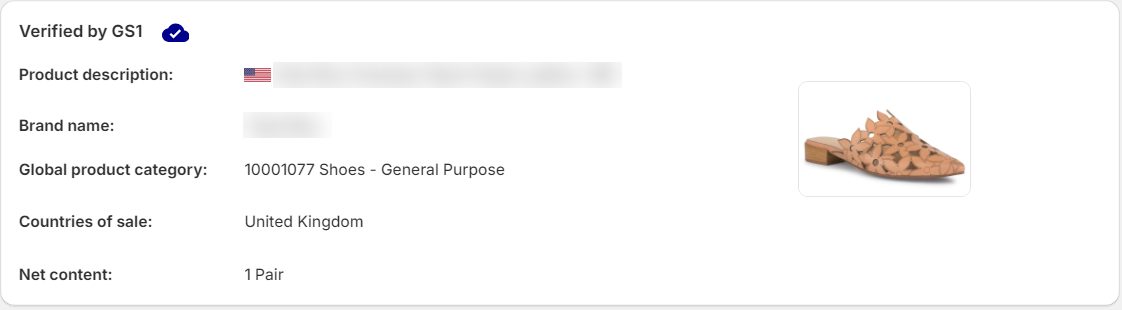
If the lookup returns a company name, trust it. If it comes back empty, you have learned nothing either way, because GS1 publishes only some of its records. Read "not found" as no answer, rather than proof the barcode is fake.
Where the barcode came from
If the lookup returns a company that is not you, GS1 licensed that barcode to that company rather than to you. Three routes account for almost all of them:
- Barcodes bought cheaply in bulk, often sold as "UPC codes" with no mention of licensing.
- Barcodes inherited from a supplier, or from a previous owner of the product line.
- Numbers made up by a barcode or label tool, which only produces digits that look right.
GS1's rule on the first one is explicit: "The Company Prefix may not be sold, leased or given, in whole or in part, for use by any other company".
If you resell other brands' products, the barcode belongs to the brand rather than to you, and Google's instruction is the right one: "you must only use the related GTIN number that is provided by the manufacturer". Ask your supplier for their barcode list. That is the end of it for you.
Hello [name]
Google has disapproved our Google Shopping listings for your products. The message says the barcode is not associated with your brand.
Google needs the barcode you assigned to these products, not one we create ourselves. Could you send the GTIN, UPC or EAN for the items below?
[paste your SKU list here]
Thanks very much.
If you make or commission your own products, there is nobody to ask, because you are the manufacturer. If you want barcodes of your own, you license a range of numbers from GS1 in your business's name, and how to license your own GS1 Company Prefix covers getting one and connecting it to Shopify.
Do you need a GTIN to sell on Google Shopping?
Google answers this on its identifier page, not on the error page. A store-brand product may not need a barcode at all: "If you're the only seller of a product or if your product is a store brand, it may not have a GTIN, and if so you don't need to submit one. Instead, submit the brand [brand] and MPN [mpn] attributes for these products".
An MPN is a Manufacturer Part Number. It can be your own internal part number, and it does not have to come from anywhere official. Shopify says where the two values go: "For products without a GTIN, you need to add an MPN (Manufacturer Part Number) and brand to the product data in the Google & YouTube channel".
In practice that means three steps:
- Open the product in your Shopify admin.
- Go to its listing in the Google & YouTube channel, not the Barcode box in Inventory.
- Fill in Brand and MPN there.
The data Shopify sends to Google is called your feed, and in the feed this setting is called identifier_exists.
If the product has no MPN either, the channel has a checkbox for exactly this. Google's instructions for the Google & YouTube app say to open Sales channels → Google & YouTube → Products → All products, tick the products you want, choose Edit in bulk editor, and then: "If your product doesn't have a GTIN or MPN because it's a custom product, then check 'This is a custom product'".
Shopify does not document what that checkbox sends to Google. Its own CSV guide says the Google & YouTube channel "doesn't use" the Google Shopping metafield columns, so do not try to set this in a product export. Tick the box, wait for the next sync, then check Merchant Center again. If the warning survives, set identifier_exists in Merchant Center's own product data or with a feed rule, which changes a value as your data arrives.
So if it is your own store brand, telling Google that the product has no barcode is a proper answer rather than a trick.
Google does not penalise you for saying it when it is true. It does publish three things you should know first.
- Say it on a product that does have a barcode, and Google gives you a warning. Google's wording: "Products for which the identifier exists
[identifier_exists]attribute is incorrectly set to no[no]or false[false]and for which there is evidence that a unique product identifier exists, will receive a warning". A warning does not remove your listing the way a disapproval does, but you still have to be telling the truth. - Reviews match less reliably without one. For Product Ratings, Google says it "may not be able to match all of your reviews to products" when there is no barcode to match on.
- One hedge Google leaves open. Products submitted without any unique product identifiers "may not be eligible for all Shopping programs or features". Google names no program and no feature. In its own definitions brand plus MPN already count as unique product identifiers, so this hedge may not describe your products at all. Treat it as a small unknown, not a reason to avoid brand and MPN.
Saying a product has no barcode costs you nothing here, but it can stop you selling elsewhere.
Walmart does check barcodes against the GS1 database. If GS1 has a barcode registered to one brand and you list it under another, Walmart treats the listing as invalid and takes it down. Walmart will grant an exemption for own-brand and handmade goods, but you have to apply for it, and it does not happen automatically.
So the choice comes down to where you expect to be selling:
- Google Shopping is the only place you sell → brand and MPN are a reasonable answer, and a documented one.
- You expect to be on Amazon or Walmart within a year or two → licensing your own barcodes solves this once, instead of once per channel.
Which of your barcodes need fixing?
The GS1 Database answers one barcode at a time. GS1 Assistant checks every variant at once and flags barcodes that are missing, duplicated or not valid GTINs. On each product, it also shows the record Verified by GS1 holds for that GTIN, including the brand name.
Free to install; usage charges apply. It flags the problem barcodes. Clearing the disapproval in Merchant Center is a separate step.
Preparing for Black Friday on Google Shopping and Amazon? Our guide to Shopify Black Friday apps for Amazon, Google and in-store selling compares feed apps and GTIN tools.
Barcode filled in, Google still says missing: not a data problem
The Barcode box is filled in. The number is valid. Merchant Center still says the barcode is missing.
This is the second no number problem, and nothing you type in Shopify will fix it. Your barcode is fine. The product itself is not getting from Shopify to Google, so Google sees no barcode at all.
Check how the product travels to Google instead:
- Confirm the product is published to the Google & YouTube channel.
- Confirm that channel has finished syncing, and is not still part-way through.
- Confirm nothing in the channel's own settings is leaving that variant out.
Shopify's poor documentation here is part of why this one is hard to pin down. If your barcode is correct and Google still disagrees, check the table at the top again and make sure this is really your problem, not one of the other three.
Frequently asked questions
Does Google check my barcode against the GS1 database?
No. Google's own guidance says two shops selling the same product send the same barcode, so Google is not checking whether the barcode is registered to you. Google does ask you to check ownership yourself, using GS1's free lookup.
How long does Merchant Center take to re-review after I fix a barcode?
Google says a change may take 24 to 72 hours to show on the Needs attention page. Fix the value in Shopify rather than only in Merchant Center, or the next sync will overwrite your correction.
Can I set identifier_exists to false for all my products?
No. It is an answer about one product at a time. If you set it to no on a product that does have a barcode, Google gives you a warning rather than a disapproval, but the answer still has to be true. Use it where it applies, not as a blanket setting.
What do I do if my supplier will not give me barcodes?
Ask again in writing, naming the products. Suppliers usually have the list even when the first person you ask does not. If the products genuinely have no barcodes and you are the only seller, brand and MPN are the documented route. Do not invent a number to fill the box.
Can two stores sell the same product with the same barcode?
Yes, and that is how it is supposed to work. Google states that barcodes are assigned by the manufacturer, so two shops selling the same product send the same value. Two shops sharing a barcode is not what the "not related to brand" error is about.
Is a made-up or placeholder barcode ever acceptable?
No. A made-up number will either be rejected as invalid or turn out to be some real product's barcode, and Google's advice is to provide a barcode only when you are sure it is correct, and to leave it out when in doubt. An empty box with brand and MPN is a better answer than a number you cannot account for.
Does Google need a 2D barcode instead of a GTIN?
No. Google reads the GTIN from your product data, not the printed barcode, and a 2D barcode carries the same GTIN anyway. What GS1 Sunrise 2027 means for your Shopify store explains the 2D change.
Fix the right problem, not the loudest one
One GS1 Database lookup on one affected product takes a minute, and it tells you which kind of problem you have: wrong number, or no number. An empty Barcode box and a barcode issued to another company produce similar-looking errors, and you can only fix the empty box inside Shopify.
If you make your own products and want barcodes of your own, licensing a GS1 Company Prefix answers this across every channel at once. A GS1 prefix gives you a range of numbers. It does not give you barcodes already matched to your products.
You still have to put a barcode on each variant, track which numbers you have used, and make the barcode images. GS1 Assistant does that from a prefix you already own. It's free to install, so you can scan one product line and see whether you have typos, duplicates, or numbers issued to somebody else. Usage charges apply.