

Is this guide for you? It's for you if your Shopify product names use accents, Cyrillic or Chinese and your labels print boxes, question marks or gaps where those letters belong. We make Label Wizard, the app in our test. On 10 November 2026 it had 4 reviews on the Shopify App Store and no Built for Shopify badge.
Why Do Some Labels Print Boxes Instead of Accents or Chinese?
What Shopify Help says about special characters
Shopify's help page for its free Retail Barcode Labels app names the problem and two fixes:
"Product information containing special characters (such as ěščřžúů, Sanskrit characters like ā, or em dashes) might not display correctly on labels. If this occurs, then manually retype the product information or use a third-party app that supports special characters."
A luggage shop in Bulgaria gave the app one star:
"It has 0 support for Cyrillic alphabets, so it becomes absolutely unusable for our shop in Bulgaria."
Retail Barcode Labels review · July 2024 · Bulgaria
Why a label shows a box
A computer can only print a character its font has a shape for. When the font has none, it draws a stand-in. Wikipedia's article on Google's Noto fonts calls these "substitute glyphs (typically small rectangles akin to ▯)" that "represent the characters that cannot be displayed because no font with the necessary characters is installed".
So a box on your label usually means its font is missing those letters. The fix is a font, or a label app, that has them.
Should You Change Your Product Names to Plain Letters?
Shopify's first fix is to "manually retype the product information". Changing names by hand works for a few products, but it causes two problems.
Your label stops matching the product title your customers see, and you keep two spellings of each name. For a Chinese name, the plain-letter version is pinyin or a translation, not the name your customers know.
Shopify's second fix keeps your names as they are. Print with a label app that supports the characters in your product titles.
How Do You Print Accented, Cyrillic and Chinese Product Names on Barcode Labels?
Label Wizard's App Store listing says: "Accented, Cyrillic and Chinese characters print correctly, exactly as typed." We tested that on 10 November 2026 with three draft products in our test store:
- Crème Brûlée Candle
- Свеча с ароматом ванили
- 手工大豆蜡香草香薰蜡烛礼盒
Each label was 2.00 x 1.00 inches, with the product title as text in Arial and the SKU as a Code 128 barcode. Label Wizard filled the title from each product's Shopify data, so we typed nothing onto the label.
In our test, all three titles printed in full in the 203 DPI PDF from Label Wizard's print dialog. The app suggests 203 DPI for thermal label printers.

Which fonts printed the characters
Label Wizard's Font family menu lists 19 fonts. We printed the same three titles in four of them: Arial, Georgia, Courier New and Impact. None of the four showed a box in our test.
Arial, Georgia and Impact printed cleanly at 203 DPI. Courier New's thin strokes broke up, and the accented and Cyrillic titles were barely readable. If you print on a 203 DPI thermal printer, avoid Courier New.
The Chinese title looked the same whichever font we picked.
Long Chinese product names on a small label
Chinese names have no spaces, so a long one can't wrap between words. The 13-character Chinese title fitted on one line of the 2-inch label, with the text element's Size range on (12 to 24 point).
If your names run longer, preview the label first and check the text is still large enough to read. Our guide to long product names on barcode labels covers wrapping and shrinking text.
Small Chinese text and print resolution
We printed the same three labels at 203 DPI and at 600 DPI, the highest resolution Label Wizard's print dialog offered.
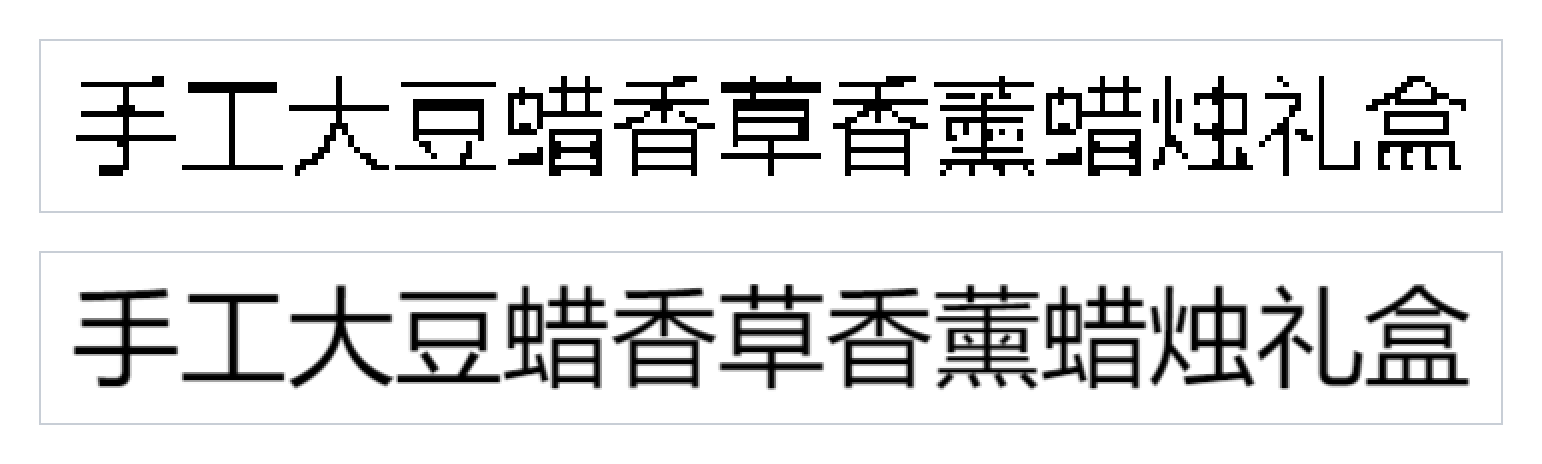
At 203 DPI, the Chinese title printed with jagged strokes, and a few thin strokes merged or dropped out. At 600 DPI, the same characters came out smooth and complete. If your Chinese names print small, make the text larger or use a printer with a higher resolution.
Can a Barcode Hold Accented or Chinese Characters?
Code 128, the barcode we printed from the SKUs, is built for plain text. Wikipedia's Code 128 article says its code sets "cover all 128 ASCII characters": English letters, digits and common symbols.
An extension, FNC4, can add Western European accented letters. But "The feature is not available for GS1-128", the version on shipping cartons and pallets. Those extra letters are Latin-1, the Western European set, so Code 128 has no room for Cyrillic or Chinese.
UPC and EAN barcodes hold numbers only. GS1 US says a GTIN can be "8, 12, 13, or 14 digits long."
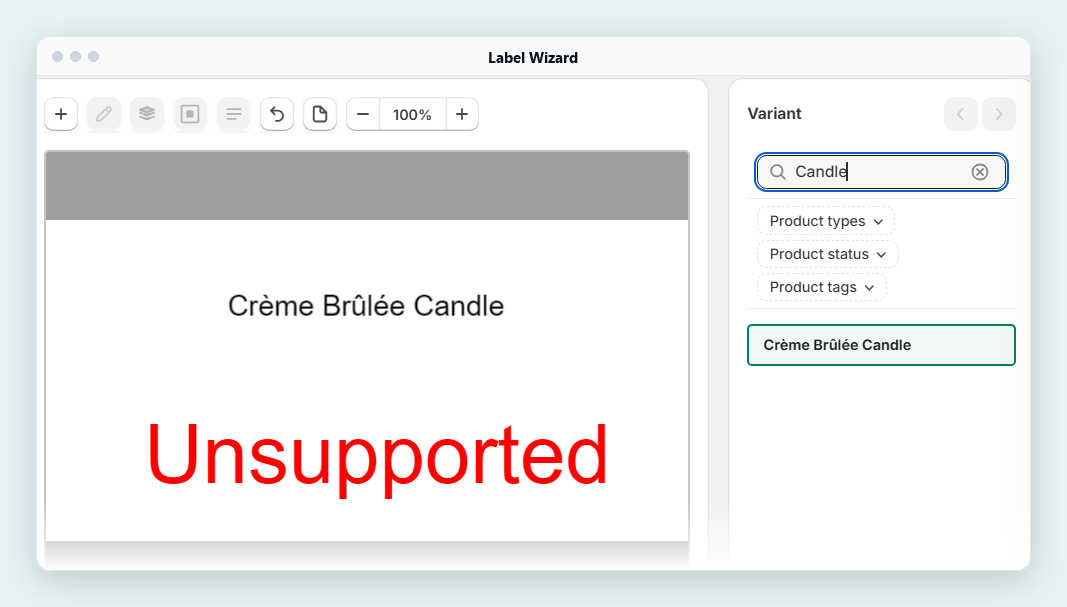
In our test, the Crème Brûlée Candle had the SKU QM-CRÈME-01. We printed that SKU as a Code 128 barcode. Label Wizard showed the word "Unsupported" in the editor and printed it where the barcode should be.
The Cyrillic and Chinese candles had plain SKUs (QM-SV-01 and QM-ZH-01), and both barcodes decoded in our test.
Shopify's SKU help page also warns: "Don't use special characters, symbols, or spaces as they can cause search problems." Keep the accents in the product title and keep SKUs and barcodes to plain letters, digits and dashes.
How Do You Check Special Characters Before a Full Print Run?
- Pick your hardest names. Choose the products with the longest titles and the letters you worry about most.
- Preview them in the label editor. Switch the preview from product to product and read each title on the label. Previewing doesn't use credits.
- Print one label of each. Print at the resolution your printer uses, then read the text and scan the barcode.
- Then print the full run.
Product names in accents, Cyrillic or Chinese? Preview Label Wizard's labels on your own products before you print a thing. Previewing doesn't use credits.
Shopify's Free App vs Label Wizard for Special Characters
| Shopify's Retail Barcode Labels | Label Wizard | |
|---|---|---|
| Accented letters (é, ě, ñ) | Help: "might not display correctly" | Printed in full in our test |
| Cyrillic | Not named by Help; a 1-star review says "0 support for Cyrillic" | Printed in full in our test |
| Chinese | Not named by Help | Printed in full in our test |
| The em dash (a long dash) | Named by Help as a problem character | Printed in our 3 November test, typed on a label |
| Accents inside a barcode | Makes its own 8-digit barcodes | Printed "Unsupported" for an accented SKU |
| Greek, Arabic, Japanese and others | Not tested by us | Not tested by us |
| Your own label size | 15 fixed sizes | Set your own size |
| Price | Free | "20 free labels, then $0.03 each" |
What We Haven't Tested
On 10 November we tested accented Latin letters, Cyrillic and Chinese. On 3 November we tested ā and an em dash typed on a label. We tested nothing else. We haven't tested Greek, Arabic, Hebrew, Japanese, Korean or other scripts, so we make no claim about them.
We printed in 4 of the 19 fonts. If your catalogue uses another script, preview a label with your own product names before a full print run.
Label Wizard prints the barcodes you already have and doesn't create barcode numbers.
Frequently Asked Questions
Why does my Shopify label print boxes instead of letters?
A box usually means the label's font has no shape for that character, so it prints a stand-in shape instead. Shopify Help says special characters "might not display correctly on labels" in its free Retail Barcode Labels app, and suggests a third-party app that supports them.
Can Shopify's Retail Barcode Labels app print Cyrillic or Chinese?
Shopify doesn't say. Its help page names accented letters, ā and em dashes. It says product information with special characters "might not display correctly on labels". It suggests you "manually retype the product information or use a third-party app that supports special characters".
Which font should I use for accented and Chinese product names?
In our 10 November 2026 test, Arial, Georgia and Impact printed accented, Cyrillic and Chinese titles cleanly at 203 DPI. Courier New broke up at that resolution. Preview your own names in the font you pick before a full run.
Can I put accents in my SKU?
Shopify advises against special characters in SKUs because they "can cause search problems". In our test, an accented SKU printed the word "Unsupported" where its Code 128 barcode should be. Keep SKUs to plain letters, digits and dashes.
Do I have to rename my products to print labels?
No. Shopify offers two fixes: "manually retype the product information" or use a third-party app that supports special characters. Label Wizard printed our accented, Cyrillic and Chinese titles in full on 10 November 2026.
For printing labels for each variant, see our guide to printing barcode labels for Shopify variants. Leaving Shopify's free app? Read switching from Retail Barcode Labels.


