


If you make your own products and bought your UPC or EAN barcodes from GS1, you own a GS1 company prefix (the block of numbers you license from GS1). Your fix is a GTIN from that prefix in every variant's barcode field. No GTINs at all? Skip to when to tick the EU declaration box.
Label blocked on an order right now? You can fix that order from the label page:
- On the label page, click Edit customs declaration.
- Enter the GTIN for each item in the parcel.
- Buy the label.
For items linked to a product, Shopify saves what you enter back to the product, so the next order for that item won't stop.
What Does Each Shopify Variant Need for an EU Shipping Label?
As of November 2026, each item in an EU parcel needs three identifiers, and on Shopify you supply one. Shopify uses the variant's ID as the M-PID and falls back to your SKU or variant ID for the NS-PID. The one that can block the label is the S-PID, a GTIN, EAN, UPC or ISBN barcode.
If one item in a parcel worth €150 or less has no standardized identifier, and you haven't ticked the declaration, Shopify won't sell you the label. Its Help Center says "the label can't be bought until the item is updated."
| Identifier | What it is | Where it lives in Shopify | Who fills it |
|---|---|---|---|
| Merchant Product Identifier (M-PID) | Your own ID for the item | The variant's ID | Shopify, automatically |
| Standardized Product Identifier (S-PID) | A barcode issued under a global standard: GTIN, EAN, UPC or ISBN | The variant's barcode field | You. If you own a GS1 prefix, a GTIN from it |
| Non-Standardized Product Identifier (NS-PID) | The maker's model, part or style code | A barcode with the NS-PID type | You, or Shopify falls back to your other barcodes, SKU or variant ID |
Carrier guides often call the M-PID your SKU. On labels you buy in Shopify, Shopify uses the variant's ID, so there's nothing to add.
What the EU Product Identifiers Rule Changed on 1 November 2026
Since 1 November 2026, the EU requires product identifiers for every item in a parcel sent from outside the EU to an EU customer and worth €150 or less. Shopify's Help Center warns that a parcel missing them "can be held or rejected at customs", and you might pay return-to-origin fees.
As of November 2026, the rule affects you if:
- You sell from the US, UK, Canada or anywhere else outside the EU, and ship parcels to EU customers.
It doesn't affect you if:
- You ship from one EU country to another.
- You already hold your stock inside the EU.
The label block applies to Shopify Shipping and Managed Markets labels. Shopify's changelog says: "If you buy labels outside of Shopify, contact your carrier, broker, or fulfillment partner to find out how to provide this information."
A GTIN covers the identifier part only. Shopify's Help Center says "product identifiers and HS codes are both required for EU shipments".
Your HS code (the customs tariff code) also decides which goods are exempt, including "certain handmade and artisanal goods". Shopify adds that "you can't mark a product as exempt yourself." Its guide to adding HS codes covers the rest.
Does a Custom Barcode Count as the S-PID?
Yes, if it's a valid GTIN. Shopify accepts a Custom-type barcode "when it's a valid GTIN of 8, 12, 13, or 14 digits." Every GTIN ends in a check digit, calculated from the digits before it. In our November 2026 test, a barcode with one wrong digit saved with no error, stayed Custom, and didn't count.
If you typed some barcodes by hand, here's how to spot a bad one:
- Open the variant and expand Barcodes under More details.
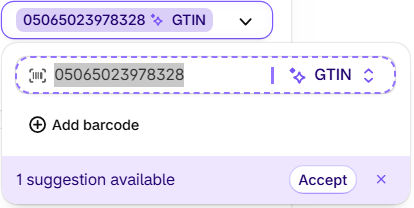
- Look at the barcode's type. A valid number shows "✦ GTIN" and the line "1 suggestion available". No type label and no suggestion? Check the number with GS1 US's free check digit calculator.
- Fix the number, then click Accept on the suggestion. Our guide to Shopify's barcode check explains what the suggestion means.
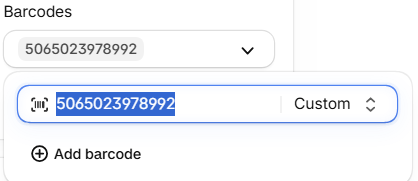
Barcodes from your own GS1 prefix get the type GTIN, even when you call them UPCs or EANs. Shopify's developer docs say to "use GTIN when the code is registered with GS1."
Set the type to GTIN first and Shopify checks the check digit: it refused to save a barcode with a wrong check digit, showing "Checksum validation failed" (dev store, 2026-11-03).
How to Find Variants Missing a Barcode in Shopify
You can find them without an app. Open your products in Shopify's bulk editor, add the Barcodes column and look for empty cells. Or export a CSV file and look for empty cells in the Variant Barcodes column. Shopify lets you add barcodes "by using the bulk editor or by importing a CSV file."
In the bulk editor:
- Open your products in the bulk editor and add the Barcodes column from the Columns menu.
- Look down the column for empty fields. The bulk editor has no sort or filter for barcodes, so you check by eye.
- Type the next unused GTIN from your GS1 list into each empty field.
- Accept the GTIN suggestion for each new barcode.
With a CSV file: export your products, fill the Variant Barcodes column, and import the file again. Shopify checks the check digit in that column when a barcode's type is gtin, and rejects a wrong one before the preview. The older Variant Barcode column (no "s") isn't checked, and a file with both columns fails.
So what happens when you have 800 barcodes to fill, not 8?
Both routes work for a handful of products. Past that, they get hard:
- You have to know which numbers in your prefix are still free. Shopify doesn't track that.
- You can't reuse a number. GS1 US calls a GTIN "a globally unique number used to identify your specific product", so one number can't go on two products.
- You type every barcode, one by one. A catalog of 200 products in 4 sizes is 800 barcode fields (an example, not a real store).
- One wrong digit typed in the admin saves without warning and leaves a Custom barcode that doesn't count.
How to Add GTINs to Every Variant from Your Own GS1 Prefix
GS1 Assistant does the part Shopify leaves to you. It flags variants with missing, invalid or duplicate GTINs, then assigns GTINs from your own GS1 prefix to one variant or your whole catalog, without duplicates, and writes each one to the variant's Barcode field, not the SKU.
- In GS1 Assistant's GTIN Manager, click Start Scan, then set the filter to Missing GTINs.
- Tick the variants, or click Select all, then click Assign GTIN.
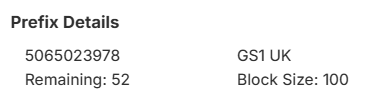
- Choose your prefix. The dialog shows how many numbers are left in it.
- In Shopify, click Accept on each "1 suggestion available", or accept them all at once in the bulk editor, so each barcode carries the GTIN type.
A merchant assigning GTINs to 600 older SKUs wrote:
“I needed urgently to create GTIN code to our older stock (600 SKU), which would else be a nightmare, since GS1 has changed its layout of the bulk upload files. This App saved me 2 days of work!”
For the full walkthrough with filters and plans, read how to bulk-assign GTINs to your Shopify catalog.
Two questions to settle before you assign:
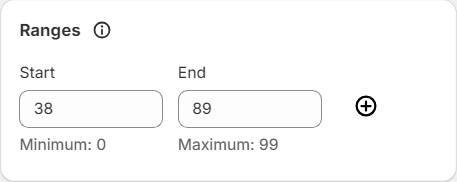
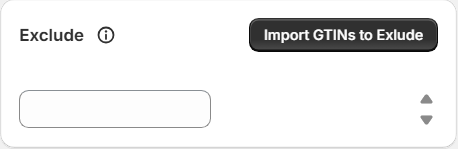
- Already used some numbers in your GS1 account, on packaging or on Amazon? Check which ones before you assign, so the same number doesn't go to two products. For numbers you already used outside Shopify, enter them in the prefix's Exclude setting and GS1 Assistant skips them, so it won't assign them. For a list, use "Import GTINs to Exclude". In our test we entered the item number (the digits after the prefix), and the app skipped it.
- Do you need to register the GTINs with GS1 first? Shopify's EU rule asks for a valid GTIN on the variant, and its Help Center doesn't mention registering. Registering is a separate GS1 step. Our GS1 company prefix guide covers it today, and how to register your GTINs in GS1 US Data Hub gives the steps.
| Shopify bulk editor | CSV import | GS1 Assistant | |
|---|---|---|---|
| Finds variants missing a barcode | You scan the Barcodes column | You scan the spreadsheet | Flags them for you |
| Knows which prefix numbers are free | No | No | Yes, it shows how many are left |
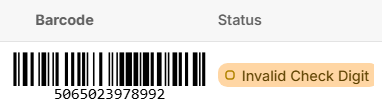
| Catches a wrong check digit | Not while the type is Custom; it saves without a warning | Yes, in "Variant Barcodes" typed gtin | Flags it as "Invalid Check Digit" |
| 800 barcode fields | 800 typed values | 800 typed values | Select all, then Assign GTIN (a prefix this size needs Growth or Automation) |
| Barcode type | You choose, or accept the suggestion | You set it in the file | Accept Shopify's suggestion after assigning |
| Cost | Free | Free | Free to install, usage charges apply |
Your plan depends on how many numbers your prefix holds. On the App Store listing, Essential ($0 a month plus usage) supports prefixes up to 100 GTINs, Growth ($4.99 a month plus usage) up to 1,000, and Automation ($29.99 a month) any size. Your first GTIN assignment is free.
Every variant you add later needs its GTIN before its first EU order too. After you add products, set the Missing GTINs filter again and assign the new ones.
Find the variants still missing a GTIN before your next EU order. GS1 Assistant flags every variant without one, then fills them from your own GS1 prefix. Free to install. Usage charges apply.
Which Shopify App Fills EU Product Identifiers?
It depends which identifier you're missing. As of November 2026, for the standardized identifier, GS1 Assistant by Left Foot Software assigns GTINs from your own GS1 prefix to one variant or your whole catalog. For HS codes, country of origin and the NS-PID, an EU customs-data app such as PIDReady fills those fields in bulk.
What Doesn't GS1 Assistant Do for EU Shipments?
GS1 Assistant fills one EU identifier, the standardized one, with GTINs from your own GS1 prefix. It doesn't add HS codes, country of origin or the NS-PID. It doesn't buy labels, file customs data or check that your product data is right. It works with a GS1 company prefix, not barcodes bought from a reseller.
When Should You Tick the EU Declaration Box?
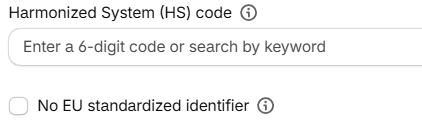
Only when the product truly has no GTIN, EAN, UPC or ISBN, such as a handmade one-off. When the declaration is on, Shopify sends no standardized identifier to customs, "even when one is saved on the variant." So if you own a GS1 prefix, fill in the GTIN instead.
You'll find it on the product or variant page: in the Shipping card, open More details and tick No EU standardized identifier. Its tooltip says those products "will declare an exception code", which customs calls Y081.
Typing "None" in the barcode field doesn't count as the declaration. Shopify staff steer merchants away from placeholder values like that.
What Are Product Identifiers?
Product identifiers are codes that tell a customs office, a marketplace or a search engine exactly which item you sell. The common ones are the GTIN (printed as a UPC or EAN barcode), the manufacturer part number (MPN) and the brand. Google Shopping, Amazon and EU customs each ask for a GTIN, and each applies its own checks.
If Google Merchant Center flags your GTINs, our guide to Shopify GTIN errors in Google Merchant Center walks through each error.
Frequently Asked Questions
Why won't Shopify let me buy a shipping label for my EU order?
Since 1 November 2026, Shopify blocks the label when an item in a parcel worth €150 or less has no standardized identifier, such as a GTIN, and the "No EU standardized identifier" box isn't ticked. On the label page, click Edit customs declaration, enter each item's GTIN, then buy the label.
Should I change my Custom barcodes to type GTIN?
Yes, if they're valid GTINs. A valid one already counts, but Shopify staff advise setting the type "rather than rely on Shopify inferring it." Shopify suggests GTIN for each valid Custom barcode, and you can accept the suggestions one by one or all at once in the bulk editor.
Is the €150 limit per item or per parcel?
Per parcel. Shopify's Help Center says the rule covers every item in a parcel sent to an EU customer from outside the EU that's worth €150 or less. The value test applies to the parcel, and the identifiers apply to each item. A parcel with five different products needs a standardized identifier on each of the five.
Does my SKU count as an EU product identifier?
For the NS-PID, yes: without one, Shopify falls back to your other barcodes, then your SKU, then the variant ID. Shopify's Help Center says "a variant that has a GTIN or a SKU already meets this requirement." A SKU can't stand in for the standardized identifier.
Can I use barcodes bought from a reseller with GS1 Assistant?
No. GS1 Assistant assigns GTINs from a GS1 company prefix that you license from GS1 yourself, and it doesn't work with numbers bought from a barcode reseller. GS1 US warns that "GTINs sourced from unauthorized third parties may already be associated with another company or product."
I sell from the UK. Does the EU product identifier rule apply to me?
Yes: the rule covers parcels sent to EU customers from outside the EU, and the UK is outside the EU. UK sellers shipping to EU customers need the identifiers too. If you buy your labels in Shopify, the same label block applies to you.


