

The steps assume you own a GS1 company prefix (the number block you license from GS1 UK). Bought single barcodes from a reseller? Jump to the reseller question.
What Should You Do First After Buying GS1 UK Barcodes?
Put one unused GTIN in each variant's barcode field and set its type to GTIN. Then record which product each GTIN is on in My Numberbank, your GS1 UK account. Shopify takes the number whether or not GS1 UK knows about it, and it doesn't fill in GS1 UK's record for you.
What you bought is a GS1 company prefix with a fixed count of GTINs. GS1 UK says that after you "Log into My GS1", "You'll get access to My Numberbank to assign and manage your barcodes, QR codes and product data" (as of November 2026).
If you haven't joined yet, our GS1 company prefix guide covers it.
The three jobs, with where each one is covered:
- Put a GTIN on each variant: by hand or by CSV, or all at once with an app.
- Set the type to GTIN: EAN or GTIN?
- Tell GS1 UK which product each GTIN is on: the GS1 UK step.
Should You Pick EAN or GTIN as the Barcode Type in Shopify?
Pick GTIN. Your GS1 UK numbers are GTINs, and Shopify's developer docs say "Use GTIN when the code is registered with GS1." The EAN barcode on your packaging carries the same 13-digit number, so you don't need type EAN. Choose GTIN and Shopify checks the check digit before it saves.
The type picker also lists Custom, UPC, EAN, ISBN, ASIN and NS-PID. EAN is the name of the barcode symbol that carries a 13-digit GTIN, so you can keep saying "EAN code" and still choose GTIN. Our SKU vs UPC guide sets the five terms side by side.
Here's what Shopify does with each type:
- Type GTIN, chosen by hand: a wrong check digit won't save. Shopify shows "1 barcode has an error" and, on the field, "Checksum validation failed".
- Custom (Shopify's label for a barcode with no type declared): the same typo saves with no warning.
- A number Shopify recognizes: Shopify's Help Center says "If you enter a barcode that's registered with GS1, then the barcode type is set to GTIN automatically."
- A saved Custom barcode: "If a saved barcode has the Custom type and its value is a valid GTIN, then GTIN is suggested as its type." You accept or dismiss the suggestion.
What that suggestion means for your catalog is covered in our guide to Shopify's GS1 barcode check.
How to Add GS1 UK Barcodes to Shopify Variants Without an App
You can do it in the Shopify admin or with a CSV file (the spreadsheet file Shopify imports and exports). Shopify lets you add barcodes "by using the bulk editor or by importing a CSV file."
- Find the variants with no barcode. In the bulk editor, add the Barcodes column from the Columns menu and scroll for empty cells. You can't sort or filter by barcode, so you're checking by eye. Or export your products and filter the Variant Barcodes column in a spreadsheet.
- Take the next unused GTINs from your block, from your GS1 UK account or your own list.
- Enter each GTIN. Type it into the variant, or write it in the CSV's Variant Barcodes column as
gtin:plus the number, then import the file. - Set each barcode's type to GTIN, or accept Shopify's GTIN suggestion where one shows. With type GTIN, Shopify refuses a wrong check digit, so fix the number and save again.
- Record which product each GTIN went on in your GS1 UK account (the GS1 UK step).
The CSV rules, in Shopify's words. "To set the industry standard that a barcode applies to, enter the barcode type and a colon before the value." "A barcode that has no type is imported as a Custom barcode." And: "Your CSV file can't have both the Barcode column and the Barcodes column."
In our test import, a GTIN written as gtin: with a wrong check digit got the whole file rejected before the preview, with "GTIN barcode checksum validation failed". The same number in the older Variant Barcode column (no "s") imported as Custom, with no check. Our bulk-assign guide has the full CSV walk-through.
Two mistakes the admin lets you save:
- A duplicate GTIN gets a warning while you type, "In use by 1 other item. View in bulk editor", but Shopify still saves it.
- A wrong check digit on a Custom barcode saves silently. It only gets stopped if you chose type GTIN first. Google Merchant Center can flag it later as an invalid GTIN.
Fewer than about 20 variants? By hand is fine. Type each GTIN, choose type GTIN, and keep your list up to date.
What if your range runs to hundreds of variants? Picture 60 products in 5 sizes, 300 variants in all (an example, not a real store). One by one, that means:
- 300 GTINs typed or pasted, none of them reused.
- Your own list kept in step, so you always know which GTINs in the block are still unused. Shopify doesn't track that.
- 300 entries again in GS1 UK's record, one per variant.
- One slip leaves a reused GTIN or a Custom barcode that nobody notices until a marketplace or retailer does.
How to Assign GS1 UK Barcodes to Every Variant at Once
GS1 Assistant by Left Foot Software assigns GTINs from your GS1 UK prefix to the variants you select, up to your whole catalog. Its App Store listing says it can "Assign GTINs from your own GS1 prefix to one variant or your whole catalog" and that it "Flags missing, invalid and duplicate GTIN barcodes".
- In GS1 Assistant's GTIN Manager, filter for variants with missing GTINs.
- Set the Status filter to Active. The Missing filter also lists draft and archived products.
- Select them, or use "Select all N+ variants".
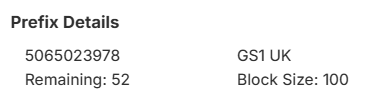
- Click Assign GTIN and choose your GS1 UK prefix. The app shows how many GTINs remain in it before you start.
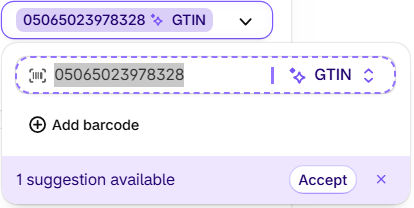
In Shopify, each new barcode shows as Custom with a GTIN suggestion, because GS1 Assistant saves it without a type. Click Accept, one barcode at a time or all at once in the bulk editor, so each barcode carries the GTIN type.
A merchant who manages their own GS1 Norway prefix wrote this. GS1 Norway, like GS1 UK, gets an import file rather than a live sync.
“Before finding GS1 Assistant, our workflow relied heavily on manual Excel spreadsheets, GS1 imports, and countless hours of administrative work.”
Two questions to settle before you assign:
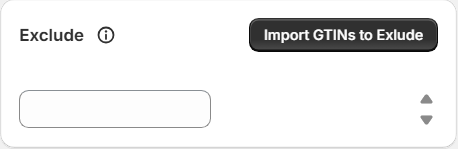
- Won't it reuse a GTIN I already used? GS1 Assistant tracks the GTINs it assigns. If you used GTINs outside Shopify, check them in My Numberbank, then enter them in the prefix's Exclude setting so the app won't assign them, or use Import GTINs to Exclude for a list. In our test we entered the item number (the digits after the prefix), and the app skipped it.
- Will My Numberbank update by itself? No. GS1 Assistant doesn't sync with GS1 UK as of November 2026, so you add the products there yourself, from a file (the GS1 UK step).
| By hand in Shopify | CSV import | GS1 Assistant | |
|---|---|---|---|
| Finds variants missing a barcode | You scan the Barcodes column | You filter the spreadsheet | Filters them for you |
| Tracks unused GTINs in your prefix | No | No | Tracks the GTINs it assigns; shows how many remain |
| Catches a wrong check digit | Only if you choose type GTIN | Yes, when written as gtin: | Flags it as "Invalid Check Digit" |
| 300 barcode fields | 300 typed values | 300 typed values | Select all, then Assign GTIN |
| Barcode type | You choose GTIN | You write gtin: | Accept Shopify's suggestion |
| GS1 UK's record | Separate step, yours | Separate step, yours | Separate step, from a file you upload |
| Cost | Free | Free | Free to install. Usage charges apply. |
So which route, and which plan, fits your store?
Plans, from the App Store listing, in US dollars: Essential ($0 a month plus usage) supports prefixes up to 100 GTINs. Growth ($4.99 a month plus usage) supports up to 1,000, and Automation ($29.99 a month) any size.
GS1 Assistant is free to install. Usage charges apply. On Essential and Growth, the listing's usage table starts with "First Assign GTIN's Free".
A 300-variant catalog needs more than 100 GTINs, which puts it past Essential and onto Growth. Check your prefix's size in My Numberbank, or in the Size column of GS1 Assistant's Company Prefixes page.
The Automation plan also offers Auto Assign, which you set up with the Shopify Flow action "Assign GTIN to Variant".
Put your GS1 UK numbers on every variant from your prefix, without reusing one. GS1 Assistant finds the variants missing a GTIN and assigns the next ones from your GS1 UK prefix. Free to install. Usage charges apply.
Not sure whether to start in GS1 or in Shopify? Our guide to assigning in Shopify first explains why it beats matching GTINs later.
How Do You Tell GS1 UK Which Product Each Number Is On?
Shopify's barcode field and GS1 UK's record are separate, so once the GTINs are on your variants, add the product details for each one in My Numberbank. GS1 Assistant can't do this live for GS1 UK (as of November 2026). It works from a file you export from My Numberbank, and you upload the result to GS1 UK yourself.
Without an app, you add products in My Numberbank one by one, each against its GTIN. For many at once, GS1 UK's bulk guide gives a spreadsheet route (as of November 2026):
- Export the file: "Side menu → Imports and Exports → Export", with "File type: Excel (XLSX) only".
- Fill it in: "Do not change headers" and "Fill all required boxes".
- Import it: open Import, then "Click the red Import button".
- Check the result: "Monitor → Actions (download report)".
GS1 UK's file rules. "Only Excel works and must be XLSX (not Google Sheets or Apple Numbers)", and "Don't rename or delete columns".
With GS1 Assistant, the route starts from your own GS1 UK file:
- Export your file from My Numberbank with the same Export step.
- In the GTIN Manager, select the variants and choose Download Import File.
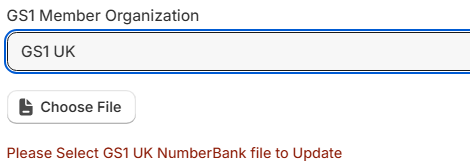
- In the Download window, set GS1 Member Organization to GS1 UK.
- The form switches to Choose File, with the prompt "Please Select GS1 UK NumberBank file to Update". It also shows Brick (GS1's product category code), Status and Target Market fields. Target Market is set to "[826] United Kingdom of Great Britain and Northern Ireland".
- Load the NumberBank file you exported and pick a Brick. The Ok button stays greyed out until you give both. GS1 Assistant updates your My Numberbank export rather than creating a new file. Open the updated file and check each row before you upload it to your GS1 portal.
Which Shopify App Works With GS1 UK Barcodes?
If you own a GS1 UK company prefix, GS1 Assistant by Left Foot Software assigns GTINs from it to your Shopify variants and updates your My Numberbank export. GS1 UK has no live connection to it and gets an import file instead. As of November 2026, the import-file organizations include GS1 UK, US, Canada, France, Norway and Romania.
Auto Sync, where GS1 Assistant sends your data to GS1 directly, works for GS1 organizations that offer a direct connection (an API), as of November 2026 including GS1 Germany, the Netherlands, Sweden and Brazil. GS1 UK isn't one of them.
Does GS1 Assistant Sync With GS1 UK?
No. As of November 2026, GS1 Assistant has no live sync with GS1 UK, so your GTINs don't show up in My Numberbank by themselves. You assign them in Shopify, then add each product in My Numberbank yourself, one by one or with GS1 UK's spreadsheet upload. GS1 Assistant also doesn't check that your product data is right.
- It doesn't register anything with GS1 UK for you. You upload the file.
- It works only with a GS1 company prefix you license, not barcodes bought from a reseller.
- It saves barcodes without a type, so you accept Shopify's GTIN suggestion.
What Is GS1 UK, and What Does It Cost?
GS1 UK is the UK's national GS1 organization. It licenses GS1 company prefixes through an annual membership priced by turnover, "from £50 per year, just over £4 a month" (as of November 2026). You create your GTINs from that prefix, and retailers and marketplaces use them to identify your products. Each one applies its own checks.
The default plan GS1 UK shows is "10 barcodes" at "£50 per year excl. VAT" (as of November 2026).
Joining GS1 UK, and how it compares with licensing through GS1 US, is covered in our GS1 company prefix guide.
Frequently Asked Questions
Is an EAN code the same as a barcode?
No. The barcode is the printed bars a scanner reads, and EAN is one barcode format. The 13-digit number it carries is your GTIN, so in Shopify, enter that number and choose type GTIN (EAN or GTIN?).
Do I need to register my numbers with GS1 UK before adding them to Shopify?
No. You can record them in GS1 UK before or after you add them to Shopify (the GS1 UK step).
Can I use barcodes bought from a reseller with GS1 Assistant?
No. GS1 Assistant assigns GTINs from a GS1 company prefix that you license from GS1 yourself, and it doesn't work with numbers bought from a barcode reseller. GS1 US warns that "GTINs sourced from unauthorized third parties may already be associated with another company or product, leading to acceptance and data quality issues."
I bought 1,000 GTINs from GS1 UK. Which GS1 Assistant plan do I need?
Growth ($4.99 a month plus usage, as of November 2026), which supports prefixes up to 1,000 GTINs. Essential supports prefixes up to 100, and Automation supports any size.
Why does GS1 Assistant show a different count from My Numberbank?
They count different things. GS1 Assistant counts the GTINs it has assigned in Shopify. GS1 UK has no live sync with it (as of November 2026), so My Numberbank doesn't see those assignments until you add each product there.
I ship to EU customers from the UK. Do I need anything else?
Yes: since 1 November 2026, parcels worth €150 or less sent to EU customers from outside the EU, the UK included, need product identifiers for each item. Your GTIN covers the standardized one. Our EU product identifiers guide covers the rest.
Essential supports prefixes up to 100 GTINs, Growth up to 1,000, Automation any size; usage charges apply.


