

Is this guide for you? It's for you if your Shopify products have SKUs, you sell in person or count stock, and you have no UPC or EAN barcodes yet. We make Label Wizard: Print Barcodes, the app the Label Wizard steps use. On 3 November 2026 it had 4 reviews on the Shopify App Store and no Built for Shopify badge.
Can I Print Product Labels If My Products Don't Have Barcodes Yet?
Yes. A label can show text, such as the product name and SKU, with no barcode at all. In our 3 November 2026 test, Label Wizard printed a variant with an empty Barcode field: the product name and two other text lines printed, and the barcode space stayed blank.
If you also want something to scan, you have two routes. Shopify's free Retail Barcode Labels app can create an 8-digit barcode for each variant, or a label app can print the SKU you already use as the barcode.
Both work for scanning in your own shop. Neither gives you a GTIN (Global Trade Item Number), the product number a UPC or EAN carries.
Every Shopify variant has a SKU field and a Barcode field. The SKU is the code you made up for your own stock. The Barcode field can hold any code, but it's also where a GTIN goes, such as a 12-digit UPC or a 13-digit EAN licensed from GS1.
One merchant asked for SKU barcodes under Shopify's free app in April 2021:
"seems if you have the sku, it should be able to create the barcode w/o an additional step"
Retail Barcode Labels review · April 2021 · United States
How Do I Turn My Shopify SKU Into a Barcode Label?
In Label Wizard, add a Barcode element to your label, set its Field to SKU and its format to Code 128, then preview and print. Shopify's barcodes help page lists Code 128 among the "non-GTIN barcodes such as Code 39 and Code 128, which can encode letters and numbers." In our test, the 15-character SKU QM-LINEN-BLU-SM printed as a Code 128 barcode that decoded as QM-LINEN-BLU-SM, on a variant with an empty Barcode field.
- Open your label design. In Shopify admin, go to Apps → Label Wizard and open the design for the label sheet you print on. If you have no design for your label size yet, our custom label size guide shows how to add one.
- Add a Barcode element to the label.
- Set its Field to SKU. The Field list offers Select, Barcode, SKU and Static text.
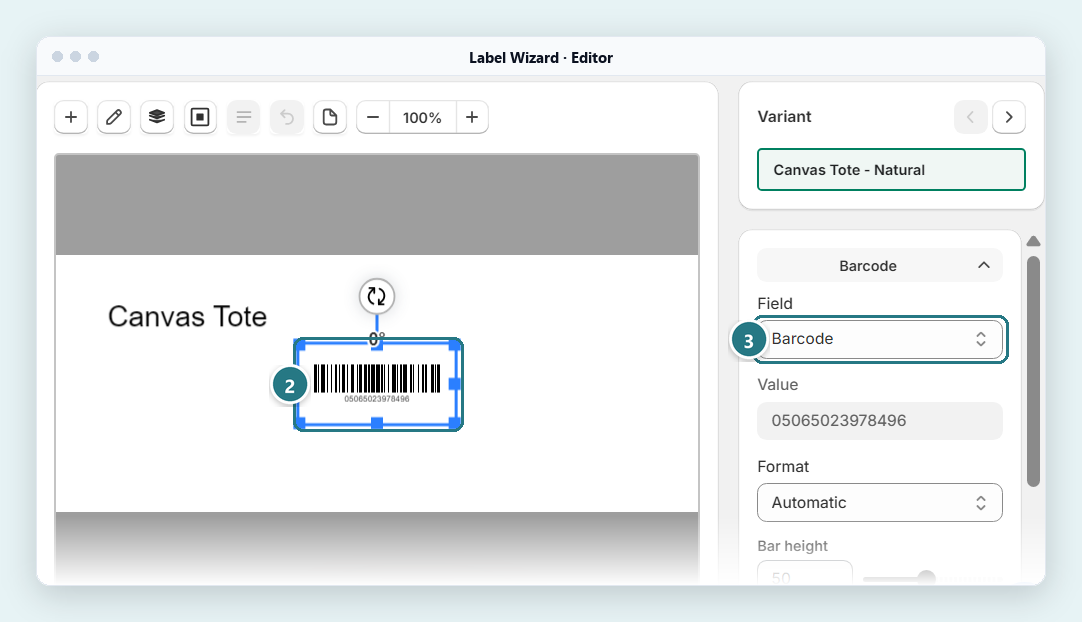
Select the barcode element (2), then open its Field list (3). Here it reads Barcode; the list also offers Select, SKU and Static text, so choose SKU. - Set the format to Code 128. The format list offers Automatic, EAN-13, UPC, GTIN-14, GS1-128 and Code 128. Pick Code 128 by name: in our editor preview, Automatic drew a 13-digit value in EAN-13 style.
- Check the SKU prints under the bars. On our test label, the Barcode element printed the SKU as text under the bars by itself. For a larger, easier-to-read SKU, add a Text element that shows it.
- Preview it on a real product. Pick a product in the editor and check the barcode and the SKU text. Previewing doesn't use credits.
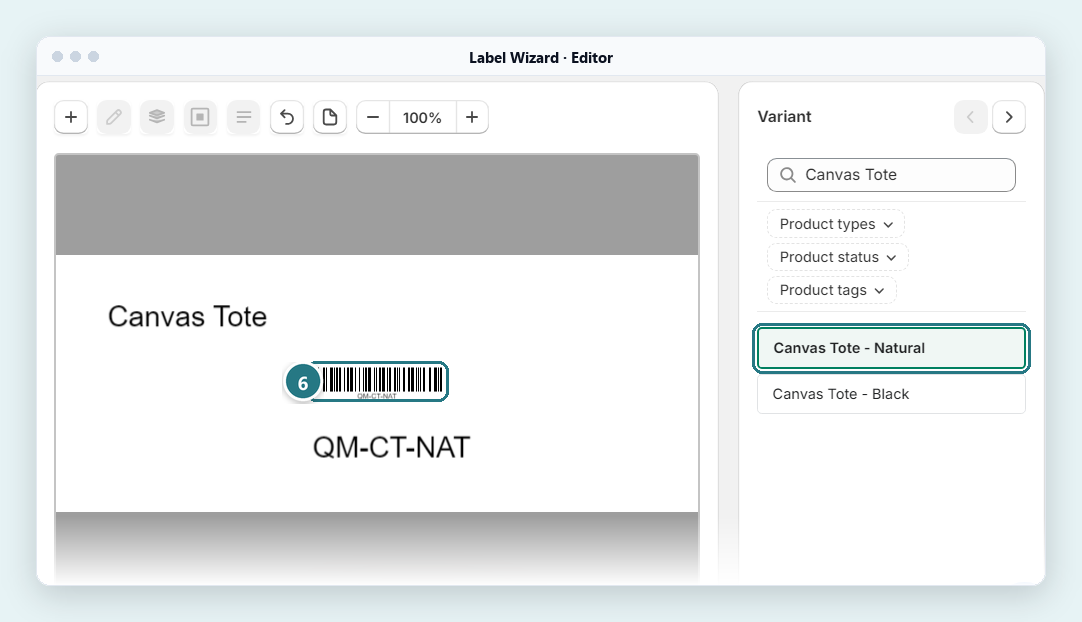
With Field set to SKU, the preview (6) draws the SKU QM-CT-NAT as a barcode. Pick another product in the Variant list to check it too. - Print. Choose your products and set how many labels each one gets. In Settings, Default print quantity sets the starting number: 1 label per product or Inventory on hand. Depending on Label Wizard's Print action setting, it opens your browser's print dialog or saves a PDF you can print later.
Why put the SKU in words too? When products look alike, a label with only bars tells your staff nothing. One merchant said so after an update to Shopify's free app:
"We manufacture hundreds of visually similar products. Printing only barcode and price substantially increases the likelihood of mislabeling inventory."
Retail Barcode Labels review · July 2026 · United States
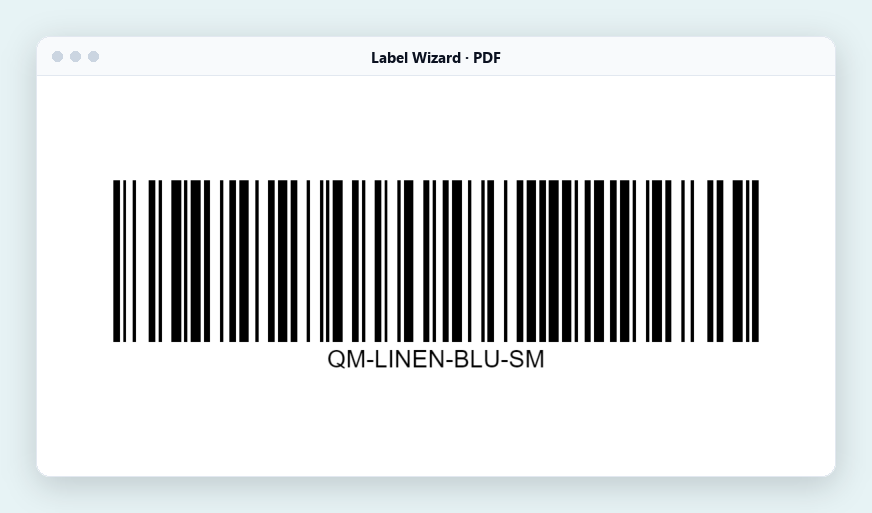
On 5 November 2026, in our test store, we set the Barcode element's Field to SKU, picked the S variant of our Linen Shirt, whose Barcode field is empty, and printed a barcode-only label to PDF. The barcode decoded as Code 128 QM-LINEN-BLU-SM, the variant's SKU. Our Canvas Tote's Natural variant has both a SKU and a barcode, and its label decoded as its SKU, QM-CT-NAT. We decoded the PDFs with software; we didn't scan a printed label.
Try it on a product that has a SKU. Set your Barcode element's Field to SKU and preview the label in Label Wizard. Start Free includes 20 free labels a month, then $0.03 each.
How Long Can a SKU Be on a Small Label?
A 15-character SKU fits a 2-inch label: in our test it filled the label's width and decoded in barcode software. Label Wizard stretches the barcode to fill its space, so a longer SKU on the same label prints thinner bars. Thinner bars are harder for a scanner to read, so test-print one label before you settle on a long SKU.
Here's what we measured on our test label:
- Label: 2.0 by 1.0 inch.
- Bars: 1.61 inches long and 0.40 inch tall, for a 15-character SKU.
- Clear space: 0.19 inch at each end. This blank margin is the quiet zone, the space a scanner needs on each side of the bars.
Shopify's free app does state limits for its Dymo sizes. Its help page lists a maximum number of digits for each:
| Dymo label, as Shopify names it | Size | Maximum, per Shopify |
|---|---|---|
| 30252 Large | 1 1/8 x 3 1/2 in | 39 digits |
| 30336 Small | 1 x 2 1/8 in | 22 digits |
| 30332 Square | 1 x 1 in | 6-8 digits |
| 30299 Price Tag | 3/8 x 3/4 in | 8 digits (not available in the United Kingdom) |
These limits belong to Shopify's app. In Label Wizard, preview your longest SKU on your label size before you print.
Doesn't fit? Make the label wider or the SKU shorter. Squeezing the bars narrower makes them harder for a scanner to read, so preview the label and print one test.
Shopify gives four SKU rules worth following before you print SKUs as barcodes:
- "Don't use special characters, symbols, or spaces as they can cause search problems."
- "Dashes and underscores are useful for separating product attributes."
- "Avoid a format where the numbers 0 and 1 can be confused with the letters O and I."
- "Each product and variant must have its own unique SKU."
Keep every SKU unique: if two products share the code you scan, Shopify POS asks you which one you meant.
What Happens If a Product Has No SKU Either?
The barcode doesn't print. In our test, a product with an empty SKU printed its name and nothing else, and the barcode's space stayed blank. Label Wizard didn't warn us, so fill in the SKU on each variant first and check the preview before a large print run.
Not sure which of your products are missing one? Two quick checks before you print:
- Export your products. Export your product list as a CSV file from Shopify admin and look for empty SKU cells.
- Preview a few variants. In the editor, step through a few products and look for a faint grey barcode: that's a placeholder, and the printed label leaves that space blank.
Label Wizard's print list shows each variant's SKU under its name when it has one, but it doesn't warn you about a missing SKU.
To add a SKU, open the product in Shopify admin, click the variant, then click SKU in the Inventory section.
Will Shopify POS Scan a SKU Barcode?
Yes. Shopify's help pages say "In Shopify POS, you can find a product by scanning or searching any of its barcodes, or its SKU." We decoded our test labels with software; we didn't scan one at a POS, so scan one test label at your own counter before you print a whole run.
Where you scan matters. Our guide to Shopify POS barcode labels covers it.
What Does Shopify's Free App Do for Products Without Barcodes?
Retail Barcode Labels can create barcodes for products that have none. It uses the last 8 digits of each variant's ID and saves that number in the variant's Barcode field. Then it prints the code as Code 128 on one of 15 label sizes.
It's free, and merchants with no barcodes use it for exactly this.
Shopify's help page covers it in three parts:
- Open the app. In Shopify admin, go to Apps → Retail Barcode Labels.
- Create the codes. Click Create barcodes → Create barcodes for products without barcodes.
- Make a template, then print. Click Create template, pick a label type and the details to show. Then go to Products, select your products and print from there.
Where does it stop? Shopify's help page names four limits, and there's one more to weigh:
- You'd manage a second number. Your staff know the SKU, but the label shows a code made from the variant ID. (That one's our point, not Shopify's.)
- The code fills your Barcode field. Shopify says these codes "aren't suitable for Google Shopping because multiple stores can share them." When you get GTINs later, you replace them.
- Two products can share a code. "Although rare, this means two products can sometimes receive the same barcode if their variant IDs share the same last 8 digits."
- It can replace barcodes you typed in. If you create barcodes for products that already have them, "the app overwrites the existing barcodes with new barcodes based on variant IDs."
- You pick from its 15 sizes. Shopify says "You can't add custom label sizes that aren't already available in the Retail Barcode Labels app." Our custom label size guide covers what to do instead.
We tried it in our test store on 4 November 2026. The app's first-run Create barcodes button had no product picker. It gave a code to every variant in the store that had none, 4 of 47, and skipped the 43 that already had one.
You might copy the SKU into the Barcode field instead, so other label apps can print it. That works in your shop.
Like the free app's 8-digit code, though, a SKU in that field takes the spot where a GTIN belongs, and Google's help asks you not to send internal SKUs in place of a product's real identifiers. Either way, replace those values before you list on Google Shopping or Amazon. Our SKU vs UPC guide explains why a SKU doesn't belong in the GTIN field.
If you'd rather scan the SKU you already use than add a new 8-digit code to each variant, use a label app that reads the SKU field. Label Wizard reads it directly and doesn't change your product data, so your Barcode field stays free for a GTIN.
For more on leaving the free app, see switching from Retail Barcode Labels.
Which App Should I Use for Products Without Barcodes?
It depends on what you want the barcode to carry. Shopify's free Retail Barcode Labels app makes an 8-digit code from each variant's ID, Label Wizard prints the SKU you already use, and generator apps make new numbers:
- You need one or two barcode images, not labels for your product list. Shopify's free barcode generator draws a number you type as a Code 128 barcode. It doesn't read your products, so you'd type each value yourself.
- Shopify's 8-digit code is fine. If its 15 sizes suit you and you're happy for Shopify to write a code into each variant, use the free Retail Barcode Labels app.
- You want the SKU you already use as the barcode. Label Wizard does that (we tested it). It reads the SKU field, not your Barcode field, so that field stays free for a GTIN later. Other label apps may print the SKU as the barcode too, so check that their barcode setting can read the SKU field.
- You already made codes with Shopify's free app. Label Wizard prints those 8-digit codes too: in our 4 November 2026 test, one decoded as the same Code 128 value the free app wrote.
- You want an app to create numbers for you. For EAN- or UPC-style codes or new SKUs, look at an app that generates them, such as RF: Barcode Labels Generator or Yanet. Label Wizard doesn't create numbers.
Here's how the four compare, going by each app's App Store listing (and, for Shopify's app, its help page) on 3 November 2026:
| Shopify Retail Barcode Labels | Label Wizard | RF: Barcode Labels Generator | Yanet | |
|---|---|---|---|---|
| Creates barcode numbers for products without one | Yes, 8 digits from the variant ID | No | Listed: "One-click barcode generation" | Listed: "SKU generator" |
| Prints the SKU as text on the label | Listed: labels "with prices, SKUs, variants" | Yes | Listed: "name, SKU, price" | Not listed on its page |
| Prints your existing SKU as the barcode | Not stated in Shopify's help | Yes, as Code 128 (decoded in our test) | Not stated on its page | Not stated on its page |
| Barcode formats | Generates Code 128 only | Automatic, EAN-13, UPC, GTIN-14, GS1-128, Code 128 | EAN-8, EAN-13, Code128, UPC-A, UPC-E | Names UPC, EAN and QR codes; no full list |
| Label sizes | 15 fixed sizes; you can't add your own | Your own size, or Avery, Online Labels and Uline templates | Lists "Custom size" | Lists "Custom size" and "various paper sizes" |
| Price to start | Free | Start Free: 20 free labels a month, then $0.03 each | Free | Free plan: 200 labels a month |
How we compared them: we read each app's App Store listing and Shopify's help page on 3 November 2026, and we tested only Label Wizard. "Not stated" or "not listed" means the page doesn't say; the app may still do it.
Before you install, here's what Label Wizard doesn't do:
- It doesn't create barcode numbers or SKUs. It prints the values your products already have.
- It prints from the Shopify admin, not from the Shopify POS app or from purchase orders.
Here's what one of its reviewers says:
“I can customise labels with product names, barcodes, SKUs, compare-at prices, and metafields.”
What's the Difference Between a SKU Barcode and a UPC?
A SKU barcode is your own code drawn as bars, usually Code 128, and only your store knows what it means. A UPC or EAN is a GTIN licensed from GS1, and it stays the same in every store that sells the product. Our guide to SKU vs UPC vs barcode on Shopify covers the rest.
When Do I Need a Real GTIN Instead?
When the product leaves your shop. A SKU barcode only means something to your own store, so don't send a SKU as a GTIN.
Google recommends a valid GTIN for products that have one. If you make the product and you're its only seller, Google lets it go out without a GTIN, with its brand and an MPN (manufacturer part number), and your SKU can be the MPN.
Amazon checks product UPCs against the GS1 database, according to GS1 US, which says GTIN exemptions are "typically available for very specific product categories, such as handmade items or private label products without barcodes." Retail buyers may ask for a GTIN too. You can keep printing SKU barcodes for the stockroom and add GTINs when you need them.
Planning to sell beyond your shop? Clear the free app's 8-digit codes out of the Barcode field first. Shopify says they "aren't suitable for Google Shopping because multiple stores can share them."
If you make your own products, GS1 Assistant, which we also make, assigns GTINs from your own GS1 company prefix to your Shopify variants. Our GS1 company prefix guide shows how to get one, and SKU vs UPC vs barcode on Shopify explains who needs one.
Frequently Asked Questions
Can I print Shopify labels with the SKU, name and price if a product has no barcode?
Yes. Text on a label prints whether or not the product has a barcode. In our tests, Label Wizard printed the product name, its price and its SKU as text. If you also want the SKU as the barcode, set the Barcode element's Field to SKU.
How can I generate a SKU barcode?
Draw the SKU as a Code 128 barcode, a format that can carry letters and numbers. In Label Wizard, add a Barcode element, set its Field to SKU and its format to Code 128, then preview the label. Label Wizard doesn't create SKUs, so add them in Shopify first. Scan one test label before you print a whole run.
What is the SKU number on a barcode?
On a SKU barcode, the bars carry your SKU. On a UPC or EAN, the bars carry the product's GTIN, not your SKU.
Can I sell on Shopify without barcodes?
Yes, for sales in your own Shopify store, unless a warehouse or fulfillment service handles your stock. Shopify's help page says barcodes "might be required" when you sell in online marketplaces, sell wholesale to retail stores, or send products through a warehouse or fulfillment service. Outside those cases, you can print your SKU as a barcode for scanning in your own shop.
Can I use a SKU barcode on Amazon or Google Shopping?
Not as a GTIN. Google lets a product you make and sell only yourself go out with its brand and an MPN, and your SKU can be the MPN. Amazon asks for a UPC or EAN, though Amazon offers a GTIN exemption for some products; our SKU vs UPC guide explains the difference.
Does Shopify's free app print my SKU?
It can print the SKU as text: its App Store listing mentions labels "with prices, SKUs, variants, and much more." Shopify's help page doesn't say the app can use the SKU as the barcode. It makes 8-digit codes from each variant's ID.
Does Label Wizard create barcodes?
No. Its App Store listing says it "Prints the barcodes you already have" and "Does not create barcode numbers". It can print your SKU as a Code 128 barcode, though.
How do I find my SKU number?
In Shopify admin, go to Products, open the product, and click the variant. The SKU sits in the variant's Inventory section.


